

Getting started with SEO & AI Search: get found on Google and in AI answers
On this page
SEO & AI Search helps people find your site, on Google and in the answers of AI assistants such as ChatGPT, Claude, Gemini and Perplexity. It checks every page, finds the searches you could win, fixes what holds pages back (with AI fixes you review first), and tracks whether assistants mention your business.
Open WPBot Pro → SEO & AI Search.
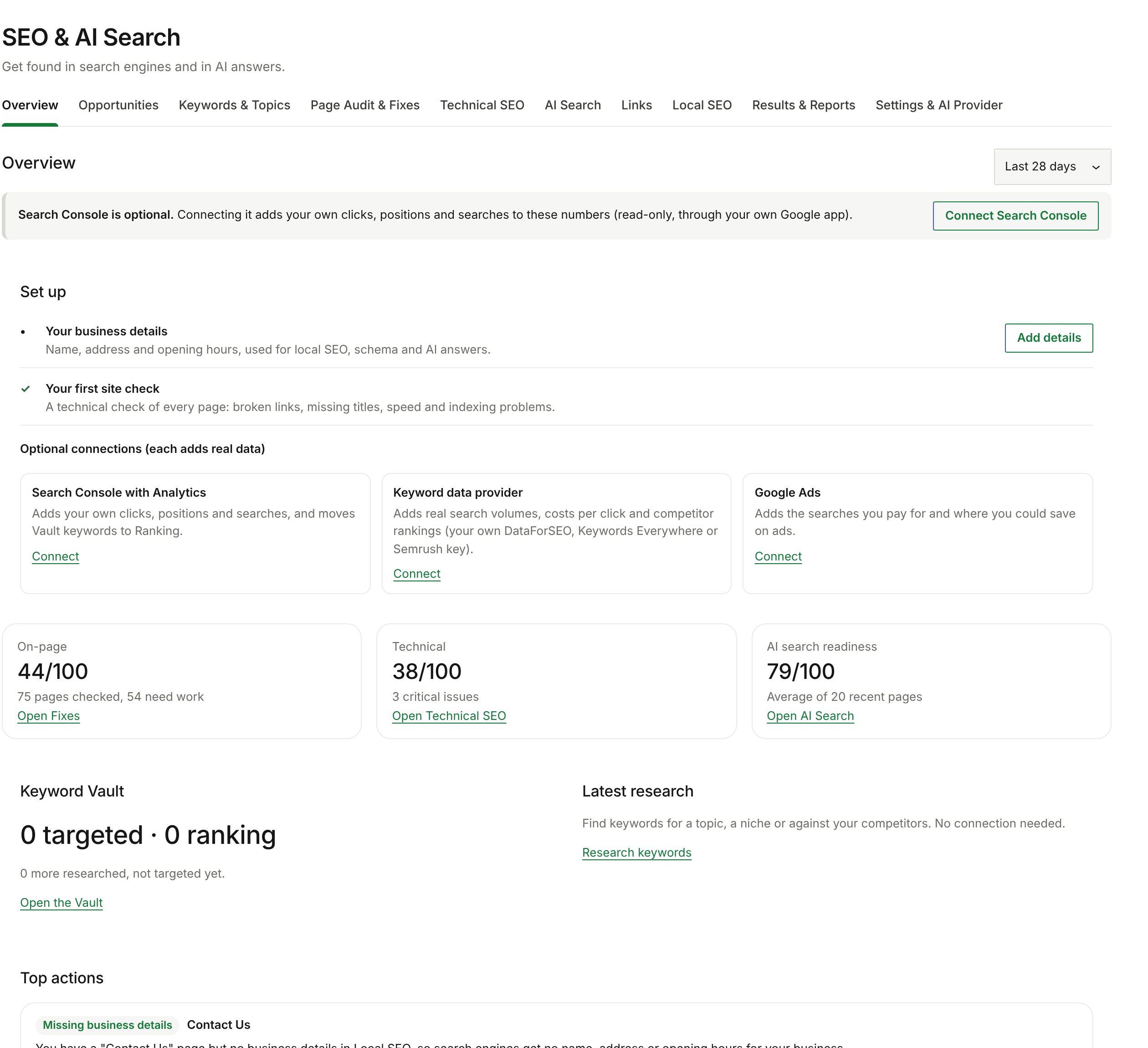
The Overview: set-up steps, optional connections, your scores and the top actions.
Where it sits in the Growth Loop
SEO & AI Search is the Get found step of the Growth Loop:
- Create → Get found: it tells AI Writer which searches have no page yet, which pages are close to page one and which need a refresh. Opportunities, the Keyword Vault and the Keyword Map all feed AI Writer's Topic Finder.
- Get found → Convert: visitors who arrive from search meet your chatbot, which answers with the same pages.
- Learn: Results & Reports measures each fix 28 days later, so you do more of what works.
- Business Context gives it your business, area and keywords; your Search Console data and Keyword Vault flow back into Business Context for every other tool.
Set it up in this order
- Run your first site check. SEO & AI Search scans your site when you open it: page audits, a technical check and a first Topic Map. Opportunities appear within minutes.
- Add your business details in Local SEO (Add details on the Overview): name, address and opening hours, used for local SEO, schema and AI answers. See Local SEO: business details, Google Business Profile, reviews and locations.
- Connect Google Search Console (and optionally Google Analytics). Everything works without it, but your own clicks, positions and searches make every list far better. See Connect Google Search Console and Google Analytics.
- Research your keywords and save the ones you want to the Keyword Vault. Mark the ones you go after as Targeted. See Keyword research: keywords, niches and competitor gaps.
- Turn on scheduled scans and alerts in Technical SEO → Schedule & alerts. See Scheduled scans and alerts.
- Check AI Search: allow the AI search crawlers, fix pages that are hard to quote, and start tracking the questions people ask assistants. See AI search readiness: make your pages easy for AI assistants to quote.
- Optional: connect a Keyword data provider (DataForSEO, Keywords Everywhere or Semrush) or Google Ads for real search volumes. See SEO & AI Search settings.
Fix things in this order for the most traffic
Opportunities ranks everything by how much each page matters and the clicks you could gain, so start at the top. As a rule:
- Indexing problems first. A page Google cannot index gets no traffic at all. Fix critical issues in Technical SEO.
- Near page one. Pages ranking in positions 8 to 20 need a small push to reach page one, where almost all clicks are. Improve them with AI Writer.
- Low click-through. Pages on page one with fewer clicks than their position should get. Rewrite the search title and description.
- Missing pages and Vault keywords without a page. Searches with impressions but no page of yours. Write the page in AI Writer.
- Decaying pages. Pages losing clicks. Refresh them.
- On-page fixes. Search descriptions, titles, internal links and alt text, many pages at once with Fix all.
- Orphan pages and internal links. Pages no other page links to are hard to find for visitors and Google.
See Opportunities: where you can win search traffic.
Get quoted by AI assistants
More and more people ask an assistant instead of searching. To be named in those answers:
- Let the AI search crawlers in. AI Search → AI crawlers lets you allow search bots (which cite your pages) and block training bots if you like. See AI crawlers: choose which AI bots may read your site.
- Make pages easy to quote. AI Search → Readiness checks each page for an answer in the first lines, a short summary, an FAQ, structured data, clear names, author and date. See AI search readiness: make your pages easy for AI assistants to quote.
- Offer llms.txt. A short, always-current index of your public pages for AI tools. It is a proposed standard, so treat it as a clean extra, not a ranking boost. See llms.txt: an index of your pages for AI tools.
- Track your visibility. AI Search → Visibility asks assistants the questions your customers ask and shows whether they name you and whom they name instead. See AI visibility: do AI assistants name your business?.
- Show up where assistants look. Links → Get cited by AI finds Reddit, Quora, YouTube and other threads that rank or get quoted for your searches, and drafts honest answers you post yourself. See Get cited by AI: show up on the sites assistants trust.
A weekly routine
| When | What to do |
|---|---|
| Monday | Read the weekly email. Open Opportunities and pick the top three. |
| Tuesday | Fix one technical or on-page issue, and send one Missing page or Near page one opportunity to AI Writer. |
| Wednesday | Check every new article with Page Audit & Fixes before it goes live, and add internal links. |
| Thursday | AI Search → Visibility: are assistants naming you? Answer one "Sites assistants cite instead" thread with Get cited by AI. |
| Friday | Results & Reports: which fixes brought clicks? Do more of those. |
How it feeds AI Writer and Business Context
- Topic Finder shows SEO & AI Search opportunities, Keyword Vault keywords without a page and Paid searches (Google Ads) as idea sources.
- The Keyword Map and Topic Map are shared with AI Writer, so new articles target searches no page covers and AI Writer warns before two pages compete.
- Fix with AI Writer, Write a page and Refresh in AI Writer open AI Writer with a brief already filled in.
- The Google connection is shared: connect once for both tools.
- Business Context can use your top Search Console searches, Keyword Vault, competitors and location as data sources.
All SEO & AI Search guides
- Start: A tour of SEO & AI Search, Connect Google Search Console and Google Analytics
- Research: Opportunities: where you can win search traffic, Keyword research: keywords, niches and competitor gaps, The Keyword Vault and rank checks, Keyword Map, Competing Pages and Topic Map, Competitors: your list, their keywords and their topics, Paid searches, Google Ads and Keyword Planner
- Audit: Page Audit & Fixes: check and fix every page, Bulk fixes and autolinking, Technical SEO: scan your site and check its speed, Redirects and the 404 log, Scheduled scans and alerts
- AI visibility: AI search readiness: make your pages easy for AI assistants to quote, AI crawlers: choose which AI bots may read your site, llms.txt: an index of your pages for AI tools, AI visibility: do AI assistants name your business?, Get cited by AI: show up on the sites assistants trust
- Links and local: Links: monitor, earn and keep links from other sites, Local SEO: business details, Google Business Profile, reviews and locations
- Reports and settings: Results & Reports: what each change did, SEO & AI Search settings
Availability
This guide describes WPBot Pro Master. SEO & AI Search Pro is included in Professional and Master.
Starter and WPBot Free have the free version: Overview, Opportunities, keyword research, the Keyword Vault, Keyword Map and Topic Map, page audits with AI fixes, the technical scan, redirects, the 404 log, speed checks, llms.txt, AI search readiness, AI crawlers, link monitoring, Get cited by AI, outreach, Local SEO for one business, results and the weekly email.
SEO & AI Search Pro adds scheduled scans and alerts, Fix all and bulk fixes, autolinking, pattern redirects, AI visibility tracking, AI-found link prospects and sending, competitor keywords and backlink data, bulk research and rank checks, the Google Ads API and Keyword Planner, llms.txt descriptions and Markdown copies, more Get cited by AI places and drafts, more locations, Business Profile performance and review requests, results by fix type and the white-label report.
Was this article helpful?
Sorry about that. Get help another way:











