

Connect Google Search Console and Google Analytics
On this page
Search Console and Google Analytics are optional: everything works without them. Connected, they add your own clicks, positions and searches to every list, so Opportunities can rank what will bring the most visitors. Access is read-only, through your own Google Cloud app, so your data stays between your site and Google. AI Writer uses the same connection.
Open WPBot Pro → SEO & AI Search → Settings & AI Provider → Connections.
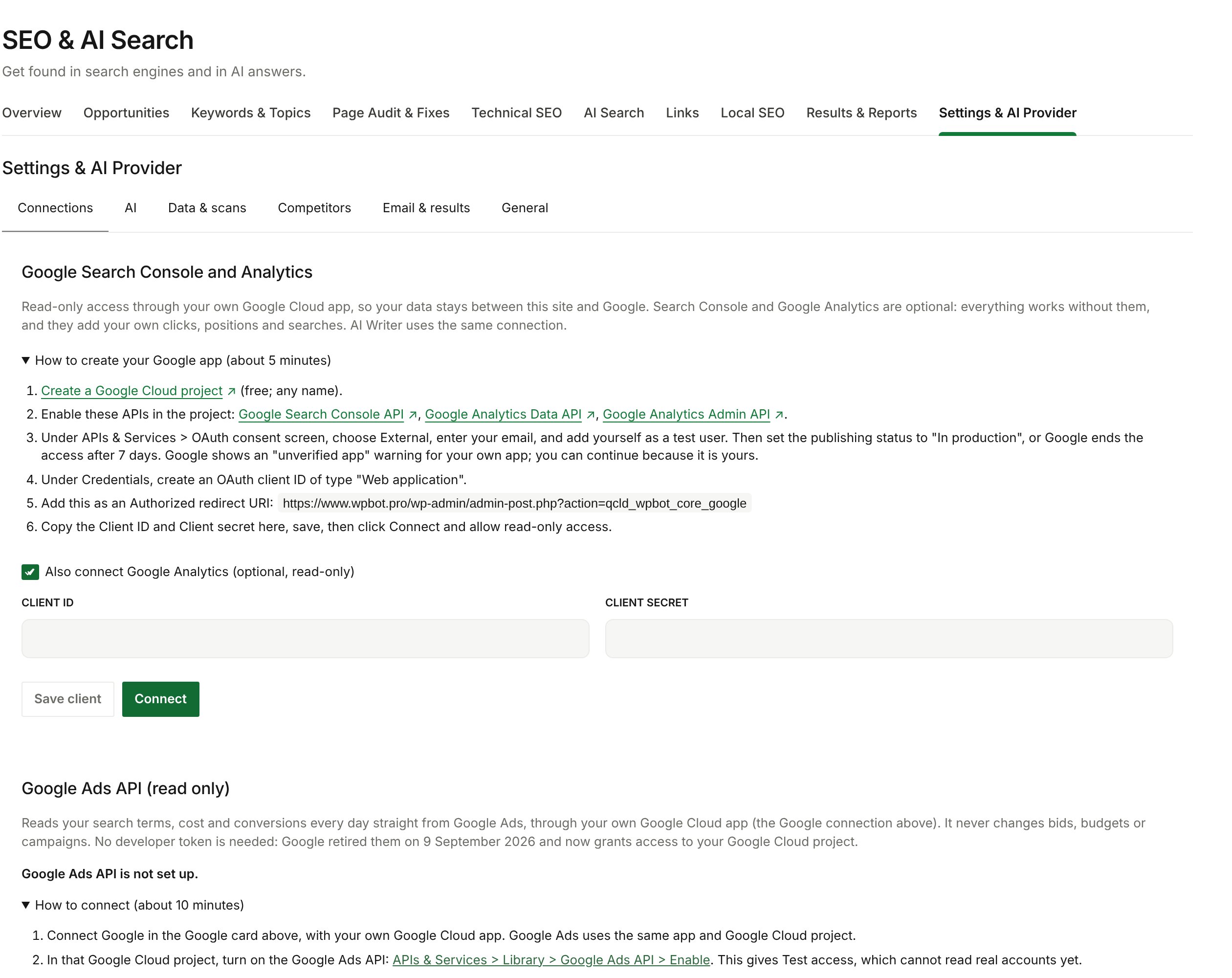
Google Search Console and Analytics, with the steps to create your Google app.
Create your Google app (about 5 minutes)
- Create a Google Cloud project (free; any name).
- Enable these APIs in the project: Google Search Console API, Google Analytics Data API and Google Analytics Admin API.
- Under APIs & Services > OAuth consent screen, choose External, enter your email, and add yourself as a test user. Then set the publishing status to In production, or Google ends the access after 7 days. Google shows an "unverified app" warning for your own app; you can continue because it is yours.
- Under Credentials, create an OAuth client ID of type Web application.
- Add the Authorized redirect URI shown on the screen. It is an address on your own site; copy it exactly.
- Copy the Client ID and Client secret into SEO & AI Search and click Save client.
Connect
- Leave Also connect Google Analytics (optional, read-only) ticked if you use Analytics.
- Click Connect and allow read-only access in the Google window.
- Choose your Search Console property and, if used, your Google Analytics property.
To add Analytics later, tick the box and click Connect again; your Search Console access stays. Disconnect removes the connection.
Warning
If the connection stops working after a week, the consent screen is still in testing mode. Set the publishing status to In production and connect again.
What it adds
- Opportunities: Near page one, Low click-through, Missing page, Decaying page and, with Analytics, Poor engagement, plus the clicks each fix could bring.
- Keyword Map: the main search of each page from its own data.
- Keyword Vault: keywords move to Ranking when your pages appear for them.
- Results & Reports: clicks and positions before and after each change (and conversions with Analytics).
- AI Writer: the Search Console source in Topic Finder, decay alerts, and search numbers on the brief.
Search Console keeps 16 months of data. SEO & AI Search keeps daily data as long as you set in Settings & AI Provider → Data & scans; Pro can keep history beyond 16 months.
Other Google connections
- Google Ads API (read only) and Google Keyword Planner use the same Google app. See Paid searches, Google Ads and Keyword Planner.
- Google Business Profile is connected from Local SEO. See Local SEO: business details, Google Business Profile, reviews and locations.
- YouTube for Get cited by AI is turned on there and also uses this app.
Availability
The Search Console and Analytics connection is in every edition, including WPBot Free. Keeping search history past 16 months, the Google Ads API and Keyword Planner are SEO & AI Search Pro (Professional and Master).
Was this article helpful?
Sorry about that. Get help another way:











