

A tour of SEO & AI Search
On this page
Open WPBot Pro → SEO & AI Search. The tabs run along the top.
The Overview
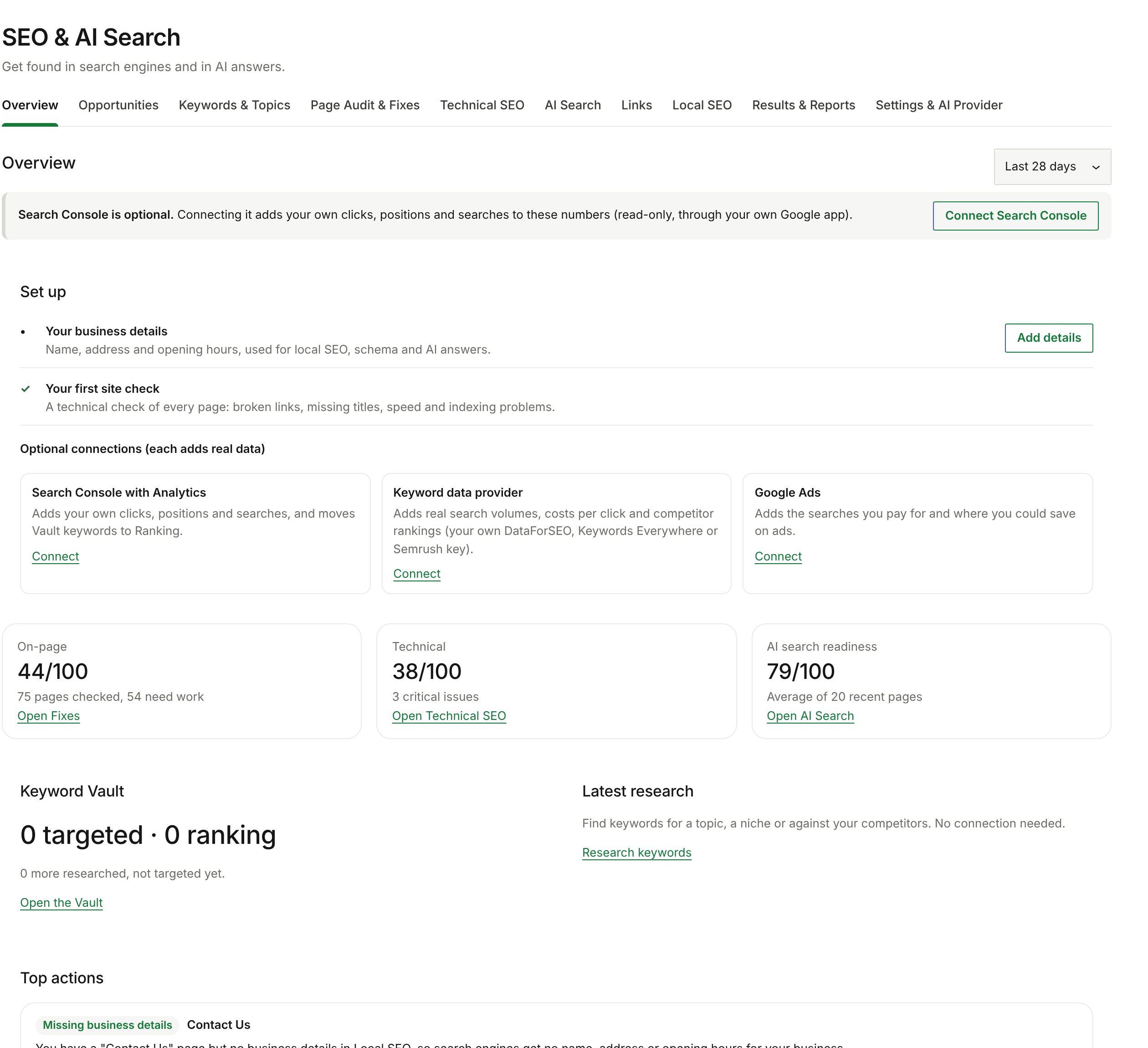
The Overview with set-up steps, connections, scores and top actions.
- Period: Last 7 days, Last 28 days or Last 3 months.
- Set up: Your business details and Your first site check, ticked when done.
- Optional connections (each adds real data): Search Console with Analytics (your own clicks, positions and searches; moves Vault keywords to Ranking), Keyword data provider (real search volumes, costs per click and competitor rankings) and Google Ads (the searches you pay for and where you could save on ads).
- Scores: On-page (the average page audit score and how many pages need work), Technical (the health score and critical issues) and AI search readiness (the average of recent pages). Each links to its tab.
- Keyword Vault: how many keywords are targeted and ranking. Latest research opens keyword research.
- Top actions: the first opportunities to work on, with See all opportunities.
Every tab
| Tab | What it does | Guide |
|---|---|---|
| Opportunities | Everything you could fix or write, ranked by the traffic you could win | Opportunities: where you can win search traffic |
| Keywords & Topics | Research, the Keyword Vault, Keyword Map, Competing Pages, Topic Map, paid and competitor searches | Keyword research: keywords, niches and competitor gaps |
| Page Audit & Fixes | Every page's on-page score, with AI fixes you review before saving | Page Audit & Fixes: check and fix every page |
| Technical SEO | The site scan, 404 log, redirects, speed, llms.txt, schedule and alerts | Technical SEO: scan your site and check its speed |
| AI Search | Readiness of each page for AI answers, AI crawlers and AI visibility | AI search readiness: make your pages easy for AI assistants to quote |
| Links | Link monitor, Get cited by AI, prospects, outreach, exchanges and backlink data | Links: monitor, earn and keep links from other sites |
| Local SEO | Your business details, Google Business Profile, reviews, locations and the service and area planner | Local SEO: business details, Google Business Profile, reviews and locations |
| Results & Reports | What each change did, the white-label report and the weekly email | Results & Reports: what each change did |
| Settings & AI Provider | Connections, AI, data and scans, competitors, email and general settings | SEO & AI Search settings |
In the editor
When you edit a post, page or product, the SEO & AI Search panel in the editor's settings sidebar shows the page's SEO score and its SEO advice. Fix with AI in SEO & AI Search opens Page Audit & Fixes for the page. The advice never blocks publishing: "You can publish now; these can be fixed any time." Save the page first to see its checks. See Page Audit & Fixes: check and fix every page.
Availability
All tabs are in every edition, including WPBot Free. Some parts of each tab are SEO & AI Search Pro (Professional and Master); each guide lists them.
Was this article helpful?
Sorry about that. Get help another way:











