

Getting started with AI Marketing: turn chatbot visitors into subscribers and sales
On this page
- What is on the AI Marketing screen
- Set it up in this order
- Capture leads from the chatbot and forms
- Welcome every new subscriber
- Write campaigns from what people ask the chatbot
- Send to the right people
- Let Autopilot work, safely
- Deliverability basics
- How to get the most leads and sales
- A 20-minute weekly routine
- How AI Marketing works with the other tools
- Availability
WPBot Pro → AI Marketing collects the email addresses your chatbot and forms gather, keeps them in clean lists with their consent, and sends welcome emails, follow-ups and campaigns that bring people back to buy. It is the Reach / Sell step of the Growth Loop.
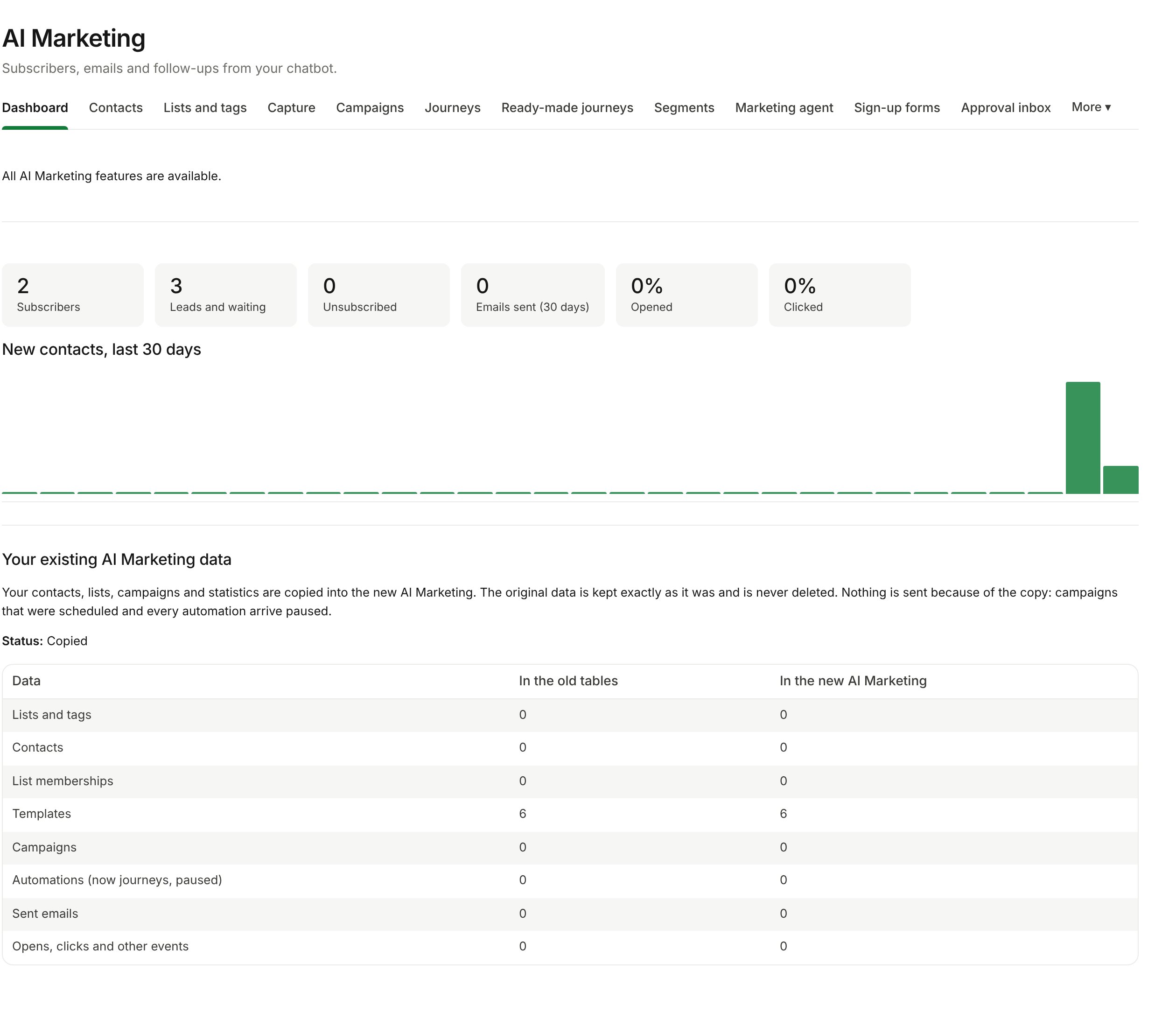
The AI Marketing Dashboard: subscribers, leads, emails sent, opens and clicks.
What is on the AI Marketing screen
Tabs that do not fit in the menu are under More.
Set it up in this order
- Fill in Settings first: FROM NAME, FROM EMAIL and your POSTAL ADDRESS, and check the Email delivery check (SPF, DKIM and DMARC). Emails that fail these checks land in spam. See AI Marketing settings and Deliverability basics: get your emails into the inbox.
- Capture chatbot leads. On Capture, keep Add chatbot contacts to AI Marketing on and click Import them now to bring in the addresses the chatbot saved before. See Capture chatbot leads into AI Marketing.
- Add a sign-up form with
[wpbot_subscribe]and connect WPForms. With Master, add a popup per topic. See Sign-up form shortcode, WPForms and other sign-up sources. - Run the one-click setup on Autopilot → Set up everything: it scans your site, creates lists, connects every capture source and prepares the welcome email.
- Approve the welcome email in the Approval inbox. From now on every new subscriber gets it.
- Add the ready-made journeys for your kind of site, such as abandoned cart and after the purchase.
- Choose a sending provider and turn on warm-up if your list is large. See Sending providers, warm-up and safety stops.
Capture leads from the chatbot and forms
The chatbot already talks to your visitors. Every email address it collects, on every channel, goes into the ChatBot Subscribers list automatically:
- People who ask to subscribe become Subscribed and can get your emails.
- People who only leave an address to be contacted are kept as Lead (not subscribed) and get no marketing email until they opt in.
Add the sign-up form, WPForms, the WooCommerce checkout box, registration and comments, and with Master, popups with a free download. Every source records consent.
Welcome every new subscriber
A welcome email that arrives within minutes is opened far more often than any later email. Use the Autopilot welcome journey or the Welcome series in Ready-made journeys: welcome, the best of your site, and an invitation to reply.
Write campaigns from what people ask the chatbot
The questions visitors ask the chatbot are the best subject lines you will ever get:
- "We answered your question" emails: when you answer an unanswered chatbot question in ChatBot → Train, everyone who asked it and left an email gets the answer (Master).
- Chat-triggered journeys: Chat left without an answer and Asked for a person follow up on their own (Master).
- Campaigns: take the three most asked questions of the week and answer them in one email, with links to the pages that sell.
Send to the right people
- Segments (Master): type who you want to reach, for example "customers who bought in the last 90 days but opened nothing", and AI Marketing finds them and keeps the group up to date.
- Lifecycle lists (Master): New subscribers, Engaged readers, First-time buyers, Repeat customers and VIP customers are kept up to date from purchases and clicks. Send VIPs early access and first-time buyers a reason to come back.
Let Autopilot work, safely
Each automation has a mode: Off, Suggest (Approval inbox), Draft and ask or Autopilot. Start with Draft and ask for anything that sends email, and Autopilot for sorting and list hygiene. Guardrails apply in every mode: only subscribed contacts are emailed, at most 2 marketing emails per person per week and 1 automated email a day by default, quiet hours, and a kill switch. See Autopilot: one-click setup, modes, guardrails and the kill switch.
Deliverability basics
- Set up SPF, DKIM and DMARC for the domain of your FROM EMAIL.
- Send through a sending provider, not your web host's mail.
- Warm up a new domain or provider.
- Keep Safety stops on: sending pauses when bounces or complaints get too high.
- Remove people who never open: the Win back silent subscribers (sunset) journey rests them after two friendly emails.
How to get the most leads and sales
- Ask at the right moment. Let the chatbot offer updates when a visitor shows interest, and offer a free download on topic pages.
- Never leave a lead waiting. A welcome email and a follow-up within a day bring the most replies.
- Recover carts. The Abandoned cart journey wins back sales you have already almost made.
- Follow up after the purchase. A check-in and a review request bring repeat buyers and reviews.
- Link every email to one page that sells, and check Reports → Revenue by email to see what earns money.
A 20-minute weekly routine
| When | What to do |
|---|---|
| Monday | Read the weekly report email and Reports. Approve or dismiss what waits in the Approval inbox. |
| Tuesday | Check ChatBot → Train for new questions. Answer them: everyone who asked gets the answer by email. |
| Wednesday | Approve the weekly newsletter, or send one campaign about the week's new article or offer. |
| Friday | Check Sending for bounces and complaints, and Contacts for new leads to follow up. |
How AI Marketing works with the other tools
- ChatBot (Convert) collects the addresses and the questions; AI Marketing follows up.
- Business Context gives your emails the right facts and voice when AI writes them.
- AI Writer (Create) and Social (Share): the topics your readers click are shared with them as content ideas (Master).
- SEO & AI Search (Get found) brings the visitors who subscribe.
- Site Insight (Learn) shows what subscribers did on your site.
Availability
This guide describes WPBot Pro Master, which runs AI Marketing with an active Master license.
Starter, Professional and WPBot Free run AI Marketing Essentials: the Dashboard, Contacts with import and export, Lists and tags, Capture (ChatBot Subscribers, the [wpbot_subscribe] form and WPForms), Campaigns with templates, test send, scheduling, pause and cancel, the pre-send check, simple Journeys, double opt-in and the email delivery check in Settings. Approval inbox, Autopilot and Lead Finder show as previews with Upgrade to Master.
Master only: Autopilot and the Approval inbox, Ready-made journeys, journey branches and chat triggers, Segments, the Marketing agent, Sign-up forms with popups and free downloads, Lead Finder, sending providers with warm-up and safety stops, Channels, Website and ads, Reports, the automatic newsletter, languages and smart timing.
Was this article helpful?
Sorry about that. Get help another way:











