

AI Advanced: chatbot skills and connections to your API
On this page
Open WPBot Pro → ChatBot → AI Advanced. Here you switch on the extra skills of the chatbot's AI in WPBot Pro, and connect it to your own systems. The backup provider, the cheaper model for short questions, the answer cache and spending limits are in AI / Settings (Getting started with AI and Account Settings: the best answers at the lowest cost).
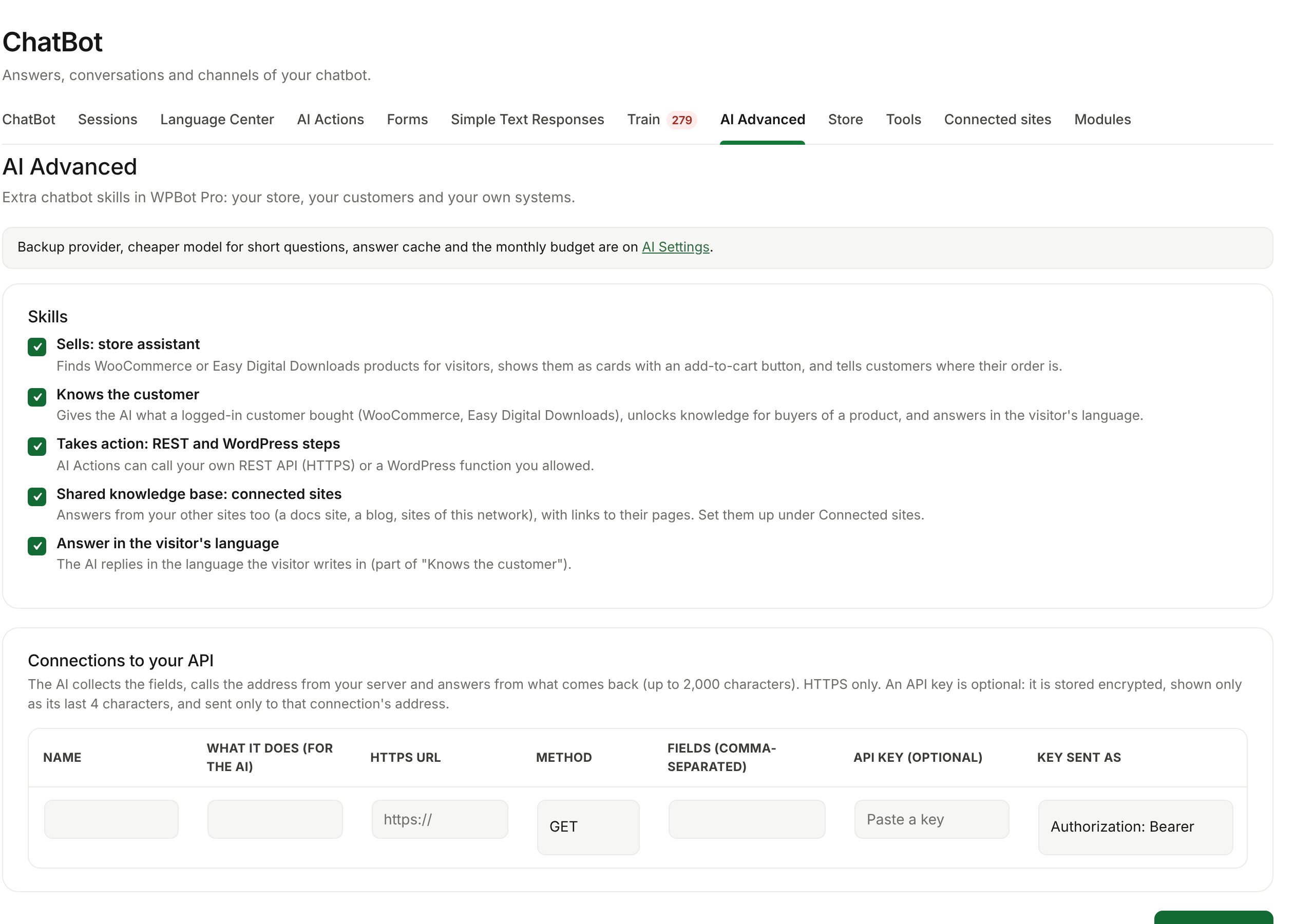
AI Advanced: Skills and Connections to your API.
Skills
| Skill | What the AI can do |
|---|---|
| Sells: store assistant | Finds WooCommerce or Easy Digital Downloads products for visitors, shows them as cards with an add-to-cart button, and tells customers where their order is. See WooCommerce store: sell more in the chat. |
| Knows the customer | Gives the AI what a logged-in customer bought, unlocks knowledge for buyers of a product, and answers in the visitor's language. |
| Takes action: REST and WordPress steps | Lets AI Actions call your own REST API (HTTPS) or a WordPress function a developer has allowed. |
| Shared knowledge base: connected sites | Answers from your other sites too (a docs site, a blog, sites of your network), with links to their pages. See Connected sites: one chatbot and knowledge base for all your sites. |
| Answer in the visitor's language | The AI replies in the language the visitor writes in (part of "Knows the customer"). |
Switch on what you use, then click Save settings.
Tip
Answer in the visitor's language is the quickest way to serve international visitors: your content can stay in one language, and a visitor who writes in Spanish gets the answer in Spanish.
Connections to your API
A connection lets the AI look something up in your own system while it chats, for example a booking calendar, a stock system or a delivery tracker. The AI collects the fields from the visitor, calls the address from your server and answers from what comes back (up to 2,000 characters).
| Field | What to enter |
|---|---|
| Name | A short name, for example "Check availability". |
| What it does (for the AI) | When the AI should use it, in plain words: "Checks free appointment slots for a date. Use it when a visitor wants to book." |
| HTTPS URL | The address of your API. HTTPS only. |
| Method | GET or POST. |
| Fields (comma-separated) | What the AI must ask the visitor first, for example date, service. |
| API key (optional) | Stored encrypted, shown only as its last 4 characters, and sent only to that connection. Remove saved key deletes it. |
| Key sent as | Authorization: Bearer or X-API-Key. |
Return short, plain answers from your API (a sentence or a small JSON object). The AI turns them into a friendly reply.
Warning
The AI decides when to call a connection, based on what you write in What it does. Connect read-only lookups, or endpoints that check their input carefully. Never connect an endpoint that deletes or changes data without its own checks.
Availability
Professional and Master. Starter and WPBot Free do not have AI Advanced. The store skill needs WooCommerce or Easy Digital Downloads.
Was this article helpful?
Sorry about that. Get help another way:











