

The knowledge base: what the chatbot learns from
On this page
The knowledge base is the content the chatbot's AI answers from. When a visitor asks a question, WPBot finds the pieces of your content that match it best and gives them to the AI, which writes the answer and links the pages it used. A complete, up-to-date knowledge base is the biggest single step to good answers.
Open WPBot Pro → AI / Settings → Knowledge Base.
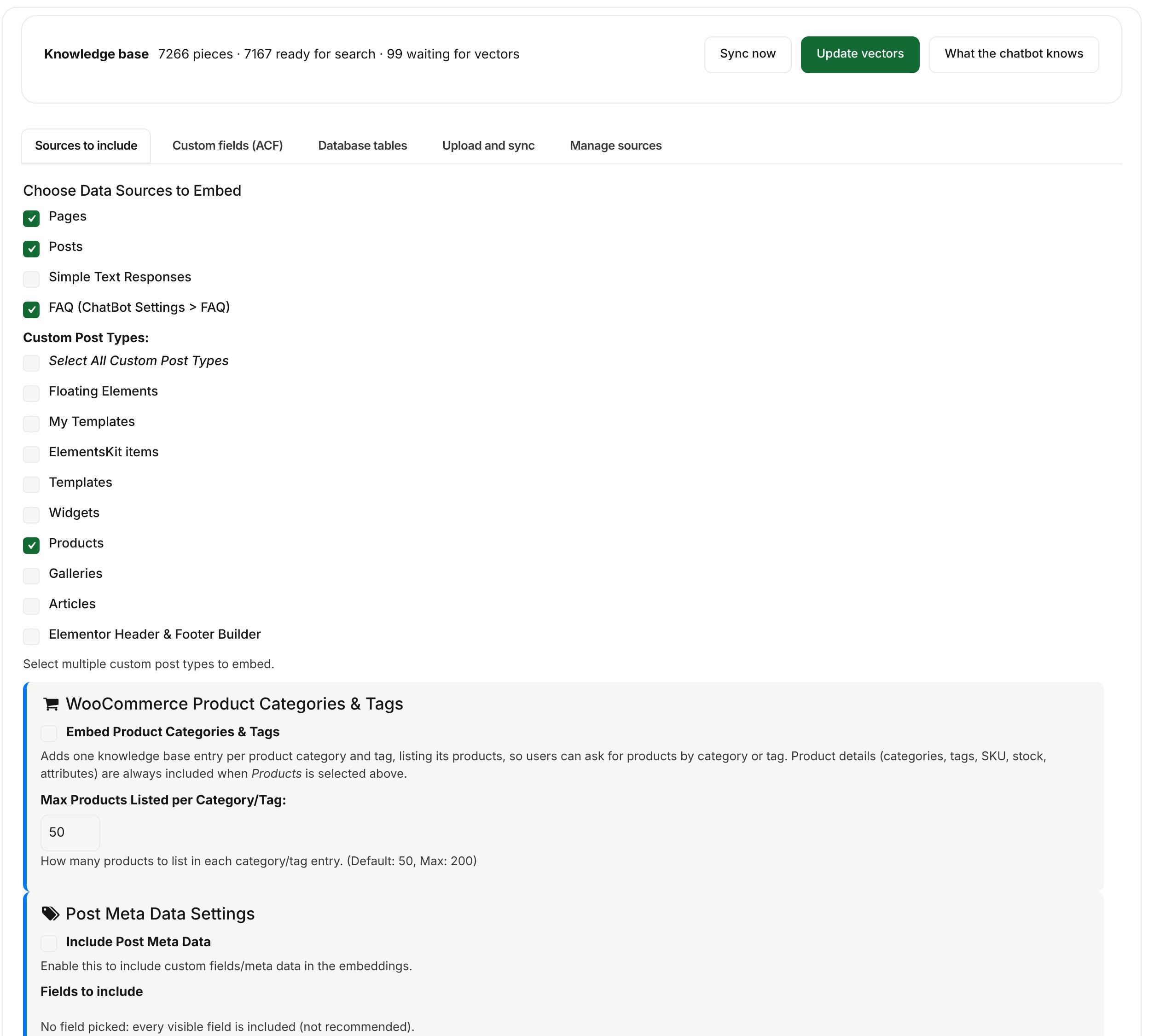
Knowledge Base: the status line and Sources to include.
The status line
At the top you see how many pieces the knowledge base holds and how many are ready for search, with two buttons:
- Sync now reads your selected sources again and adds what is new or changed.
- Update vectors prepares search vectors for pieces that are waiting. Vectors let the chatbot find content by meaning, not only by matching words. They are made with your AI provider's embeddings, which cost a little; the screen shows an estimate.
Without an AI provider that offers embeddings, the knowledge base uses keyword search. Syncs and vectors run in the background; reload the page later to see the result.
Sources to include
Under Choose Data Sources to Embed, tick what the AI may learn from:
- Pages, Posts, Simple Text Responses and FAQ (ChatBot Settings > FAQ).
- Custom Post Types: products, articles, galleries and your other post types, or Select All Custom Post Types. With Products ticked, product details (categories, tags, SKU, stock, attributes) are always included.
- WooCommerce Product Categories & Tags: Embed Product Categories & Tags adds one entry per category and tag listing its products, so visitors can ask for products by category. Max Products Listed per Category/Tag (default 50, at most 200).
- Post Meta Data Settings: Include Post Meta Data adds custom fields to the knowledge. Pick the Fields to include from the list of fields found on your post types (with how many posts use each one and an example value). If you pick none, every visible field is included, which is not recommended. Show hidden fields (start with _) lists internal fields too.
Warning
Include only content you are happy for visitors to read. The chatbot can quote anything in its knowledge base. Leave out private post types and custom fields with internal notes, costs or personal data.
How much context each answer gets
Max Context Documents (Top K): how many matching pieces are sent to the AI with each question (default 5). More pieces give more context but use more tokens, so each answer costs more. Raise it to 8 to 10 if answers miss details spread over several pages; lower it to 3 to save cost on a small site.
Keep it in sync
- Enable Auto Sync (on Save) updates the knowledge whenever you publish or update a post or product. Keep it on.
- Embed All Selected Sources reads all ticked sources now, for example after you tick a new post type.
- Click Save Settings to keep your choices.
More sources
| Tab | What it adds | Guide |
|---|---|---|
| Custom fields (ACF) | Fields from Advanced Custom Fields or Secure Custom Fields | Teach the chatbot your custom fields (ACF) |
| Database tables | Your own database tables and text-to-SQL for exact figures | Answer from database tables and spreadsheets (text-to-SQL) |
| Upload and sync | PDF, CSV, Word and XML files, sitemaps, Google Sheets and Docs | Add documents, sitemaps and Google Sheets or Docs |
| Manage sources | Every file, sheet and sitemap as one source, to sync or delete | Add documents, sitemaps and Google Sheets or Docs |
To see and check everything the chatbot has learned, open What the chatbot knows (Check what the chatbot knows). How the AI uses it (source links, "not sure" answers) is set in AI / Settings → Answers: see Control how the chatbot answers.
The knowledge base in the Growth Loop
Every article you write with AI Writer, every Help Center article and every product you add becomes chatbot knowledge as soon as it is published, with Auto Sync on. And every question the chatbot could not answer shows up in Train, telling you what to write next. That is the Create → Convert → Learn part of the Growth Loop.
Availability
The knowledge base with pages, posts, custom post types, Simple Text Responses, the FAQ, product price and stock, and PDF, CSV and XML uploads is in every edition, including WPBot Free. Professional and Master add product categories and tags with product details, post meta data, custom fields (ACF), database tables with text-to-SQL, Word files, sitemaps, and Google Sheets and Docs with daily sync.
Was this article helpful?
Sorry about that. Get help another way:











