










































AI Agent + MCP Client Included

WPBot - Automator for Advanced WordPress Automation

Build no-code workflows with a drag-and-drop builder, AI Agent, MCP Client, Custom App, webhooks, APIs, conditional logic, and advanced workflow tools inside WordPress to connect apps, automate tasks, and manage processes.

14 Days Money Back Guarantee

40+ Triggers and Actions for
Unlimited Automation

Connect your favorite apps and tools easily. From sales and marketing to HR, accounting, and technology, WPBot- Automator offers lightning-fast integrations for all needs.

FluentCRM

WordPress

WooCommerce

WPForms

Contact Form 7

Mail

Webhook

Facebook

API

MailboxLayer

FluentCRM

OpenAI

Gemini

Mistral AI

Grok AI

OpenRouter

Google Sheets

Iterator

Iterator End

Telegram

WhatsApp

Instagram

LinkedIn

Data Transformer

Text Formatter

XML Parser

Email Parser

cURL Importer

JSON Parser

Webpage Parser

CSV Parser

Unit Converter

Fluent Forms

MailRefine

Filters

CSV Creator

Tables

Workflows

Delay

WPBot

Social Actions

Advanced Data Parsers

One Builder for Your Entire Automation Process

WPBot – Automator  covers the complete workflow cycle, from the first trigger to the final action, with control over
connected tools, data, logic, execution, and recovery.

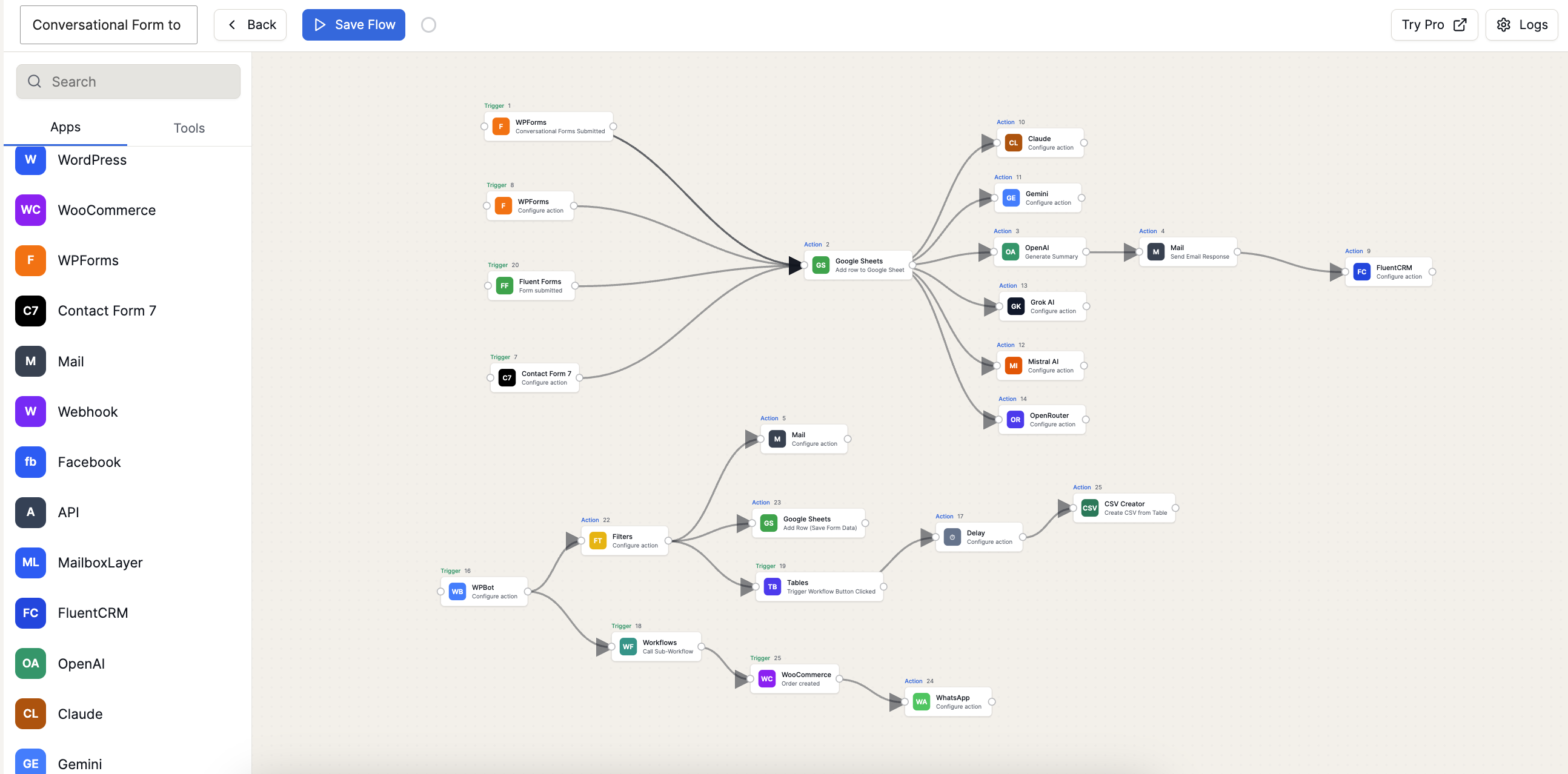
Build the workflow

Create visual automations where every trigger, action, condition, tool, and branch remains easy to follow

Connect the Right Tools

Connect WordPress plugins, SaaS apps, CRMs, spreadsheets, webhooks, APIs, email tools, and AI services.

Control the data

Data table, combine, format, and reuse data from forms, orders, users, apps, APIs, and previous workflow steps.

Monitor every run

Review workflow logs, identify failed tasks, receive alerts, and re-run actions without rebuilding the automation.

Everything You Need to Control
Your Workflow Logic

Connect your favorite apps and tools easily. From sales and marketing to accounting and technology,

WPBot- Automator offers lightning-fast integrations for all needs.

AI Agent

Workflow outputs using connected AI models, prompts, tools, getting AI response and mapped fields in one flow.

Router

Router to split one workflow into different paths based on rules.

Conditions

To add conditions on the workflow answer, or app fields from any app.

Repeater/ Loop

Handle repeated actions, batches, retries, lists, and multi-step tasks with clear control in one flow.

Delay

Wait for minutes, hours, days, weeks, or months before sending emails, updates, reminders, or follow-ups when needed.

JSON Partner

JSON data from APIs, webhooks, or apps. Extract the fields you need and map them.

CSV

CSV files or text and turn rows into usable workflow data. Send records to sheets, CRMs, emails, apps, or custom actions with mapping in each flow run.

Email Temaplate

Using the email timestamps builder, can make own email templates. And can set for the automation.

AI Agents That Think, Act, and Deliver Results

Give your workflows a brain. WPBot- Automator AI Agents autonomously reason through complex tasks, call the right tools, and iterate until the job is done — no manual intervention required.

WooCommerce Automation Features

WPBot Automator lets WooCommerce store owners automate repetitive tasks using trigger-based workflows. These workflows can automatically manage orders, products, customers, inventory, carts, checkout events, notifications, and marketing actions.

WordPress Automation

Connect plugin events with emails, spreadsheets, CRMs, alerts, webhooks, APIs, and team notifications.

Form Automation

Connect plugin events with emails, spreadsheets, CRMs, alerts, webhooks, APIs, and team notifications.

What You Can Automate With
WPBot Automator 

Combine triggers, data mapping, conditions, app actions, AI, approvals, scheduling, and
monitoring to automate complete business processes.

WooCommerce Operations

WPBot Automator streamlines WooCommerce operations by automating orders, fulfillment, and customer communication. Automatically manage order statuses, transactional emails, customer roles, and internal records. Monitor inventory and product updates and trigger alerts or marketing actions automatically. Recover lost sales by connecting cart abandonment and checkout events to CRM and email follow-up workflows.

Support Automation

WPBot Automator enhances support automation by automatically routing customer inquiries to the right team or helpdesk. Integrate AI chatbots to answer common questions and escalate complex issues to human agents. Automate personalized follow-ups after support interactions to improve customer satisfaction. Centralize support data by automatically logging queries, updates, and support events in Google Sheets.

Agency Automation

WPBot Automator simplifies agency operations by automating client onboarding, lead management, and reporting. Automatically create accounts, send welcome materials, and organize clients in your CRM. Centralize leads and deploy standardized workflows and templates across multiple client websites. Use webhooks, activity logs, Telegram, and Slack to monitor important events and keep your team informed.

AI Workflows

WPBot Automator uses AI to intelligently process data, make decisions, and automate complex workflows. Connect with AI platforms like WPBot to understand natural language and trigger website actions automatically. Process and transform JSON, XML, and CSV data using advanced parsers and AI. Build smart, self-operating workflows that respond to user behavior with personalized actions.

Marketing Automation

WPBot Automator simplifies marketing by automating lead capture, CRM syncing, and email campaigns. Connect with Meta Ads and Google Ads for event tracking, retargeting, and conversion optimization. Reach customers through WhatsApp, Telegram, and Facebook with automated messages and notifications. Manage and connect your marketing data using Google Sheets, Webhooks, and external marketing platforms.

Start Simple, Then Scale the Workflow

Build simple WordPress automations first, then add more steps, logic, integrations, and data
control as your workflow needs grow.
1.
Choose a Trigger

Start with a form submission, order, user event, schedule, webhook, or connected app trigger.

2.
Connect Your Tools

Add WordPress plugins, CRMs, spreadsheets, email tools, APIs, webhooks, and AI services.

3.
Activate and Monitor

Launch the workflow, review every run, receive failure alerts, and re-execute tasks when needed.

Add AI to Smarter Workflows

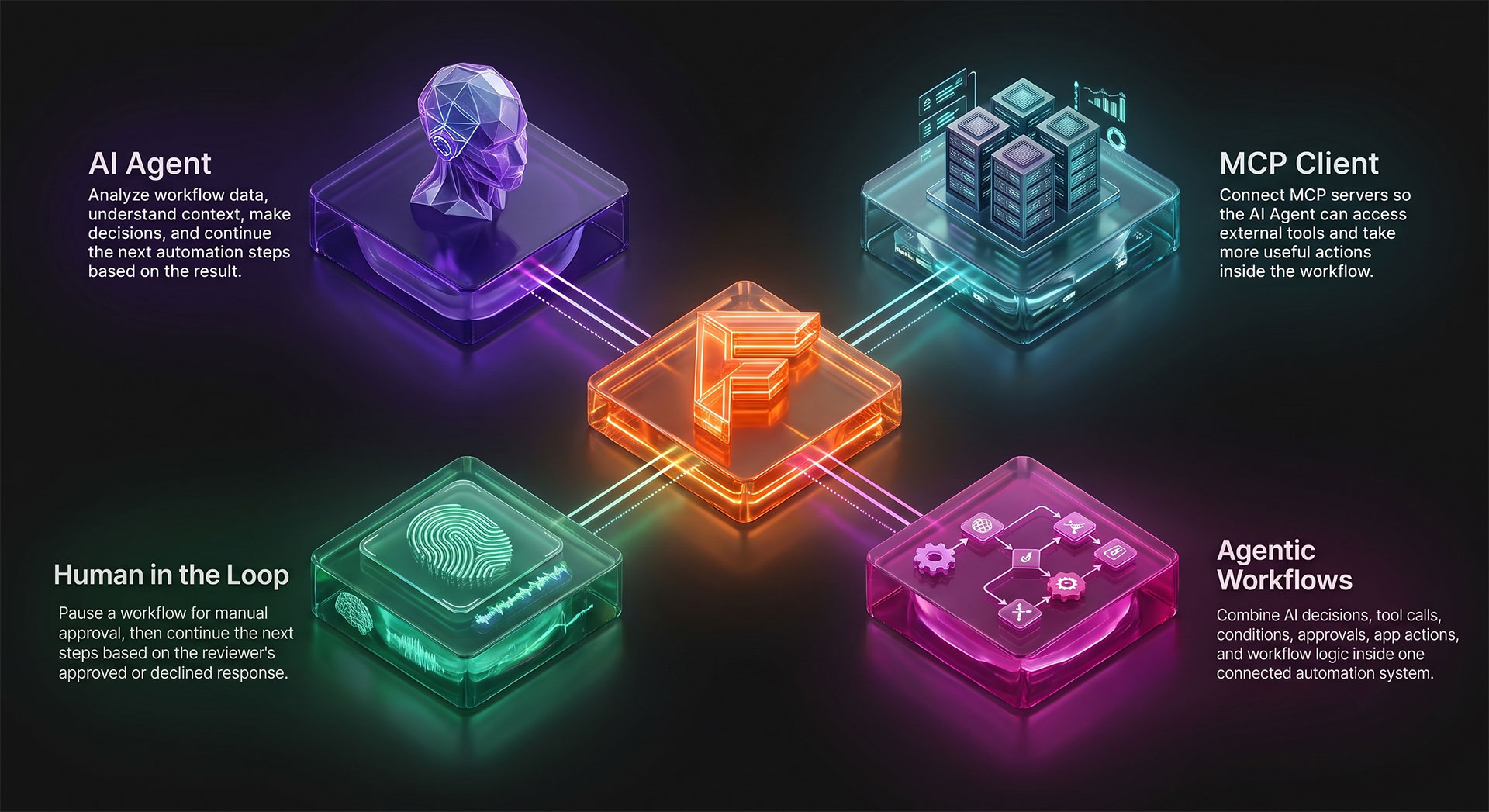
WPBot- Automator combines AI Agent, MCP Client, human approval, app actions, and workflow logic so automations can analyze information,
make decisions, call tools, and continue based on the result.

Ready to Automate Your Workflows?

Join thousands of businesses using WPBot- Automator to
streamline operations, save time, and scale efficiently.

Automator Pro is available with the WPBot Master License.

Got more questions?

Contact our ChatBot Support Heroes. They’ll provide you with all the information you need.

Contact us

Customer support is very responsive and professional. The script is awesome and with many features, including A.I. from Dialogflow. High quality.

Newpolaris

If have a 7 Stars won’t hesitate to rate that chatbot as a 7stars+++ Very helpful prompt team support Cannot find enough words express my happiness for purchasing that CHATBot Good Luck for you and your items

Ahsmartsolutions

X
Let's chat if you need any help finding the right product or need support.
FAQSend Us Email