

Guide visitors in the chat window
On this page
Many visitors open a chat and do not know what to type. The Guidance tab of the chat window designer adds small helpers that get them to their first question, and to the next one. Open WPBot Pro → ChatBot → Customize ChatBot Design → Guidance.
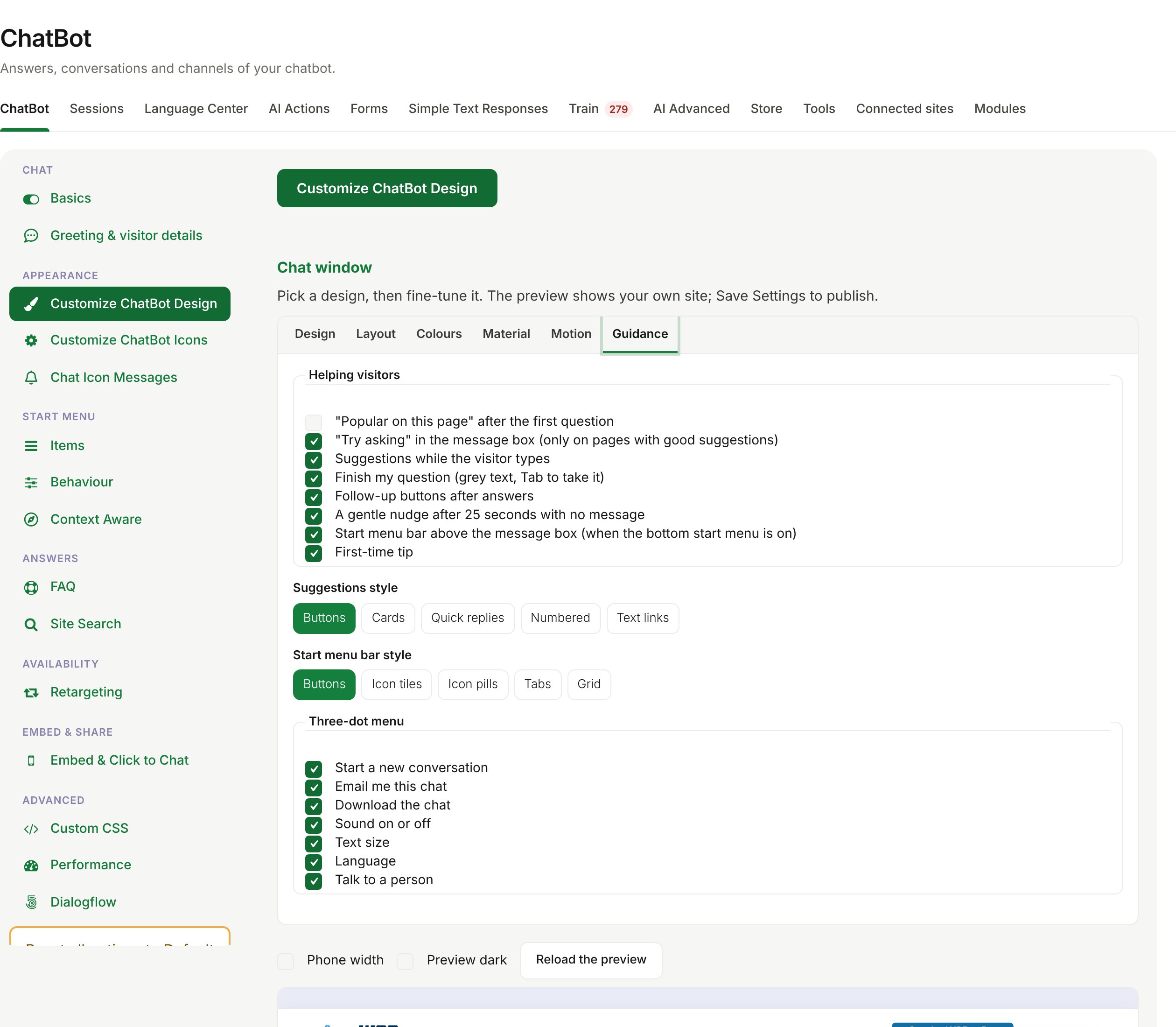
The Guidance tab.
Helping visitors
| Option | What the visitor sees |
|---|---|
| "Popular on this page" after the first question | Start menu items that match the page they are on. |
| "Try asking" in the message box (only on pages with good suggestions) | An example question as the placeholder text. |
| Suggestions while the visitor types | Matching questions appear above the message box. |
| Finish my question (grey text, Tab to take it) | The rest of a likely question in grey; Tab accepts it. |
| Follow-up buttons after answers | Buttons for the next likely step after an answer. |
| A gentle nudge after 25 seconds with no message | A short prompt when the chat is open but quiet. |
| Start menu bar above the message box (when the bottom start menu is on) | The start menu as a bar, when Always show the start menu at the bottom of the chat window is on in When the start menu shows. |
| First-time tip | A short tip the first time a visitor opens the chat. |
The suggestions come from what your site already knows, with no AI call: the page rules of Context Aware start menu, start menu items that match the page, and the items visitors often click on that page. When nothing is relevant enough, nothing is shown.
Styles
- Suggestions style: Buttons, Cards, Quick replies, Numbered or Text links.
- Start menu bar style: Buttons, Icon tiles, Icon pills, Tabs or Grid. Icons come from the items' icons in Build the start menu.
Three-dot menu
Choose which items the window's three-dot menu offers: Start a new conversation, Email me this chat, Download the chat, Sound on or off, Text size, Language and Talk to a person.
- Email me this chat sends the transcript to the visitor. It needs Chat Sessions, and it is hidden when Disable email transcript is ticked in Email Setup.
- Language shows when several chatbot languages are set up (see Multi-Language: one chatbot in several languages).
- Talk to a person hands the chat to live chat or another way to reach your team, when one is set up.
Which helpers bring the most conversations
- "Popular on this page" and Follow-up buttons: they turn one question into a conversation that ends on a product, a form or a booking.
- Suggestions while the visitor types: fewer questions end in "Sorry, I did not understand".
- A gentle nudge on pricing and product pages, where visitors hesitate.
Keep Talk to a person on if you offer live chat: visitors who ask for a person are often ready to buy.
Availability
Every option is in every edition, including WPBot Free, except these, which are in every WPBot Pro edition: Finish my question, A gentle nudge, and the suggestion and start menu bar styles other than Buttons.
Was this article helpful?
Sorry about that. Get help another way:











