

WPBot editions: Free, Starter, Professional and Master
WPBot comes in four editions. WPBot Free is on WordPress.org. WPBot Pro comes as Starter, Professional or Master; each Pro edition includes everything in WPBot Free. This Help Center describes Master, and each article ends with a note when a feature is missing from another edition.
Compare the editions
"Free version" means the edition includes the tool's free version instead of the Pro one.
| Feature | Free | Starter | Professional | Master |
|---|---|---|---|---|
| AI chatbot: 7 providers plus Ollama, knowledge base, source links, Train, answer cache, spending limits | ✓ | ✓ | ✓ | ✓ |
| Business Context, Permissions, Notifications, Error log | ✓ | ✓ | ✓ | ✓ |
| Chat Sessions (history, analytics, AI Insight, questions not answered) | ✓ | ✓ | ✓ | ✓ |
| AI Writer | Free version | Pro | Pro | Pro |
| Help Center | ✓ | ✓ | ✓ | ✓ |
| Knowledge base Pro sources (Word files, sitemap, Google Sheets and Docs, database tables, custom fields, product categories) | — | — | ✓ | ✓ |
| SEO & AI Search | Free version | Free version | Pro | Pro |
| Site Insight | Free version | Free version | Pro | Pro |
| Simple Text Responses Pro, Conversational Forms, WooCommerce store tools | — | — | ✓ | ✓ |
| AI spending report by channel and provider, spike alerts, CSV, weekly email | — | — | ✓ | ✓ |
| Social | Free version | Free version | Free version | Pro |
| AI Marketing | Free version | Free version | Free version | Pro |
| Messenger, Instagram, WhatsApp, Telegram | — | — | — | ✓ |
| Live chat, Support Tickets, Voice Chat, Voice Messages, Multi-Language | — | — | — | ✓ |
| Webhooks and CRM (HubSpot, FluentCRM, Mailchimp) | — | — | — | ✓ |
| White Label, Settings Export / Import | — | — | — | ✓ |
Your data moves with you
All editions share the same settings and data. When you upgrade (Free to Pro, or Starter to Master) everything you set up stays, and the new features appear. See Upgrade from WPBot Free to Pro (and keep your data).
Which edition do I have?
Open Plugins: the WPBot Pro row shows the edition in its name, for example "WPBot Pro WordPress Chatbot (Master)". The license screen in the WPBot Pro menu also carries the edition name, for example Master License.
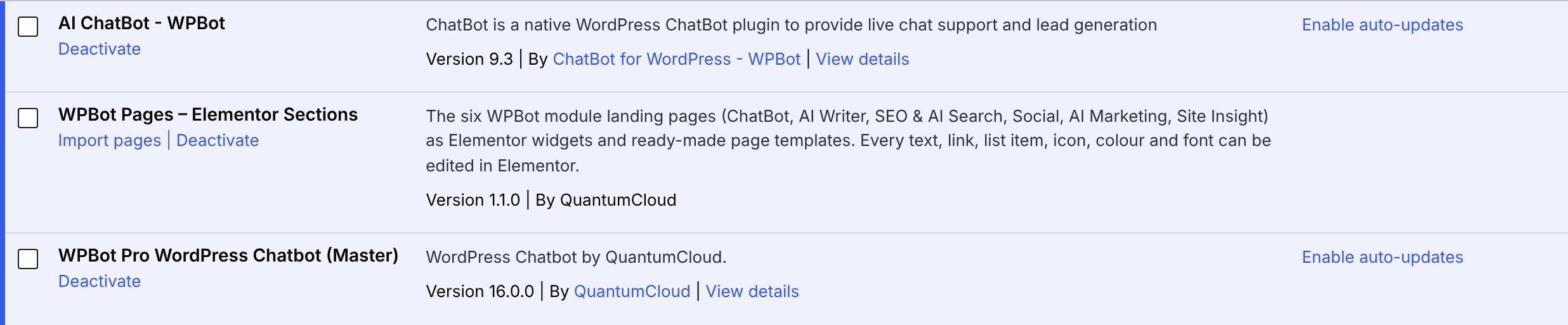
WPBot Pro Master and WPBot Free side by side in the Plugins list.
Next steps
Was this article helpful?
Sorry about that. Get help another way:











