

Connect LinkedIn
On this page
LinkedIn connects through your own LinkedIn app. Posts go to your own profile. Open WPBot Pro → Social → Accounts and click Connect on the LinkedIn card.
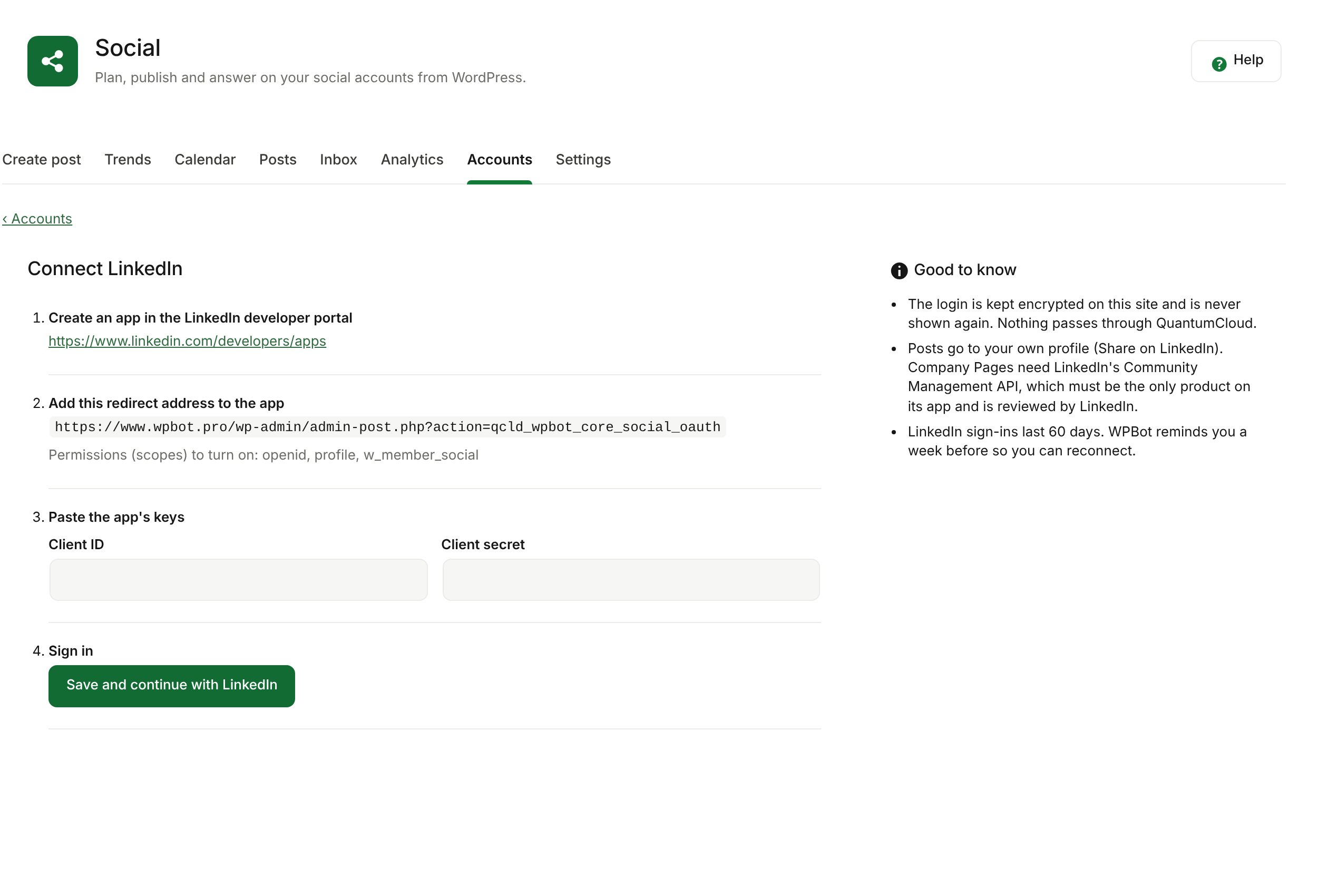
Connect LinkedIn with your own LinkedIn app.
Steps
- Create an app in the LinkedIn developer portal (linkedin.com/developers/apps).
- Add the redirect address shown on the screen to the app.
- Turn on these permissions (scopes):
openid,profile,w_member_social. In the portal they come with the products Share on LinkedIn and Sign In with LinkedIn using OpenID Connect. - Paste the app's keys: Client ID and Client secret.
- Click Save and continue with LinkedIn and sign in.
Good to know
- LinkedIn sign-ins last 60 days. WPBot reminds you a week before, so you can reconnect in time.
- Company Pages need LinkedIn's Community Management API, which must be the only product on its app and is reviewed by LinkedIn. Social posts to your profile.
- Links show as a link card. Write with AI writes medium-length LinkedIn posts; change the technique in Settings → Writing → Per network.
- LinkedIn gives WPBot no post numbers, so Analytics shows "—" for reach. Visits, leads and sales from your tracked links are counted.
Availability
Master only.
Was this article helpful?
Sorry about that. Get help another way:











