

Page Audit & Fixes: check and fix every page
Open WPBot Pro → SEO & AI Search → Page Audit & Fixes. Pages are also checked when you publish or update them. Search titles and descriptions are saved through your SEO plugin.
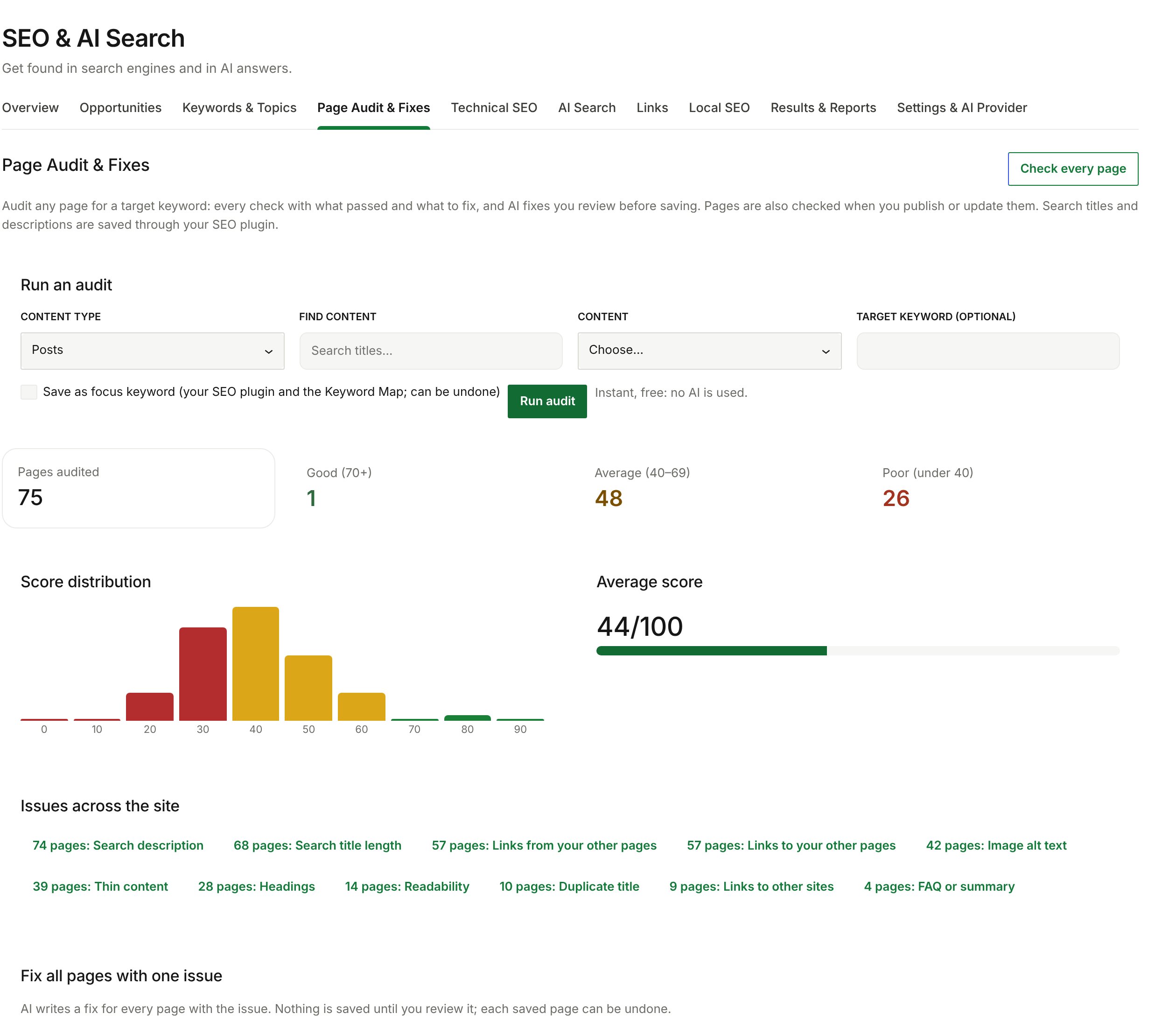
Run an audit, the score distribution and the issues across the site.
Run an audit
- Choose the CONTENT TYPE (Posts, Pages or Products) and find the page under CONTENT.
- Optionally enter a TARGET KEYWORD. SEO & AI Search suggests one from your Keyword Vault, your SEO plugin's focus keyword, the Keyword Map or the page's main search in Search Console. Tick Save as focus keyword to write it to your SEO plugin and the Keyword Map (can be undone).
- Click Run audit. It is instant and free: no AI is used.
Check every page audits the whole site.
What the audit checks
| Group | Checks |
|---|---|
| Search appearance | Search title length, search description, duplicate title, duplicate description |
| Keyword | Main search in the title (skipped without a target keyword) |
| Content | Thin content, headings, readability, FAQ or summary |
| Links | Links to your other pages, links from your other pages |
| Images | Image alt text |
| AI search readiness | How easy the page is for AI assistants to quote (see AI search readiness: make your pages easy for AI assistants to quote) |
Each check is Passed, Warning, Needs a fix or a Tip (not scored). The page gets an SEO score out of 100. Score over time and Audit history show how the page developed.
Fix with AI
From the audit, or Fix this page in Opportunities:
- Search title and Search description: Fix with AI proposes new ones; Review before saving, then Save title or Save description.
- Write alt text with AI for images without alt text.
- Write an FAQ with AI: the FAQ is added at the end of the page. Check every answer is true for your business.
- Rewrite the introduction with AI.
- Internal link suggestions: "Link … here to …", with Add link.
- Fix with AI Writer opens bigger rewrites in AI Writer.
Fixes are saved straight to the page; you can undo each one under Recent changes. If no SEO plugin is active, SEO & AI Search prints the search title and description on the page itself.
The site summary
- Pages audited, and how many are Good (70+), Average (40–69) and Poor (under 40), with the Score distribution and Average score.
- Issues across the site: how many pages have each issue. Click one to see those pages, filtered by IMPACT (High impact, Medium, Low), with Audit & fix for each.
To fix one issue on many pages at once, see Bulk fixes and autolinking.
In the editor
The SEO & AI Search panel in the editor's settings sidebar shows the SEO score and SEO advice for the page you are editing. Fix with AI in SEO & AI Search opens this screen. Save the page first to see its checks. You can publish either way: "You can publish now; these can be fixed any time."
Tip
Audit every new article before it goes live, with its target keyword. Fixing the search description and adding two internal links takes a minute and helps the page get found.
Availability
Page audits, AI fixes, the site summary and the editor panel are in every edition, including WPBot Free. Fix all, bulk fixes and autolinking are SEO & AI Search Pro (Professional and Master).
Was this article helpful?
Sorry about that. Get help another way:











