

Returns and refunds
Open WPBot Pro → ChatBot → Store → Returns. The Requests tab is your queue; Policy and emails holds the rules.
How customers request a return
- WooCommerce customers find Returns in My Account.
- Guests use a page with the shortcode
[wpbot_returns]: they enter their email and order number and confirm with a code sent by email.
They choose the items, quantities, reason, photos and the resolution they want, see a summary and get a reference. They can later ask "Where is my refund?" with the reference and their email.
Requests
Filter by status: Requested, Approved, Awaiting return, Received, Refunded, Exchanged, Store credit issued, Rejected and Cancelled, and by store. Search by reference, order or email. Each request shows the order, customer, resolution, amount and a Risk signal.
Policy and emails
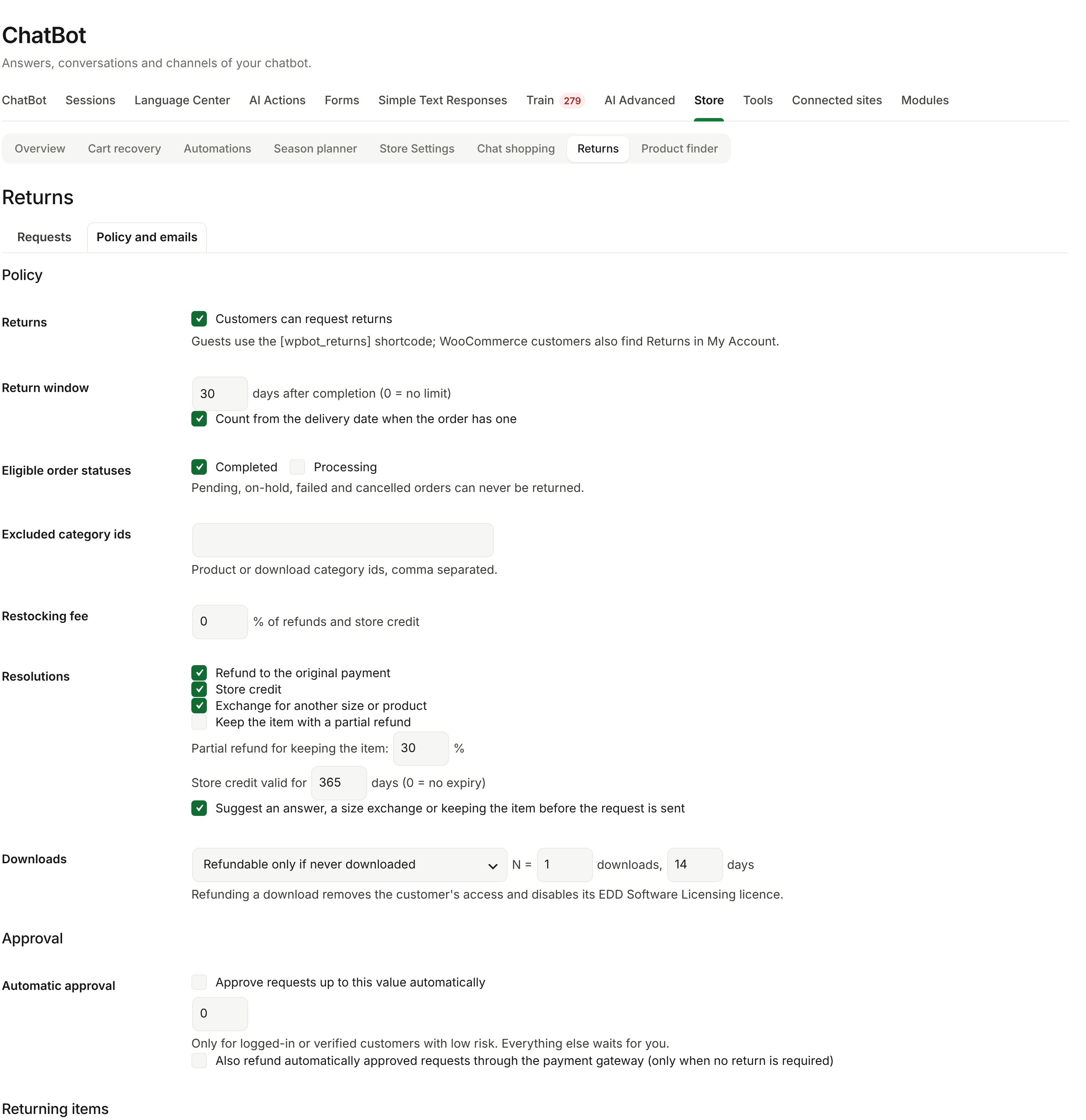
Returns policy: window, resolutions, approval and emails.
| Setting | What it does |
|---|---|
| Returns | Customers can request returns. |
| Return window | Days after completion (0 = no limit); optionally Count from the delivery date when the order has one. |
| Eligible order statuses | Completed and/or Processing. Pending, on-hold, failed and cancelled orders can never be returned. |
| Excluded category ids | Categories that cannot be returned. |
| Restocking fee | A percentage of refunds and store credit. |
| Resolutions | Refund to the original payment, Store credit, Exchange for another size or product, Keep the item with a partial refund (with its percentage), and how long store credit is valid. |
| Suggest an answer, a size exchange or keeping the item before the request is sent | Save offers: a knowledge-base answer, a size exchange or a partial refund. Saves shows how often each was accepted. |
| Downloads | For digital products: refundable only if never downloaded, while downloaded fewer than N times, within N days, or always inside the window. Refunding a download removes access and disables its Software Licensing licence. |
| Automatic approval | Approve requests up to this value automatically, only for logged-in or verified customers with low risk; optionally refund them through the payment gateway when no return is required. |
| Return required | Items must be sent back (an RMA number is given on approval); optionally run the refund, credit or exchange when items are marked received. Add Return instructions. |
| Emails | Email the customer when the status changes, and where new requests go (empty: the site's admin email). |
Tip
Offer an exchange and store credit next to refunds. Many customers happily take a different size or credit, and you keep the sale.
Availability
In Master and Professional, with the WooCommerce module. Works with WooCommerce and Easy Digital Downloads. Not in Starter or WPBot Free.
Was this article helpful?
Sorry about that. Get help another way:











