

Cart recovery: win back abandoned carts
On this page
Many shoppers add products to the cart and leave. Cart recovery saves the cart with the shopper's email and sends reminders until they buy. It works with WooCommerce and Easy Digital Downloads.
Open WPBot Pro → ChatBot → Store → Cart recovery.
Results
At the top: Abandoned value, Recovered value, Recovery rate, Coupon cost and Emails sent for 7, 30 or 90 days, the discount budget used this month, Recent carts with their status, and Results per email.
Settings
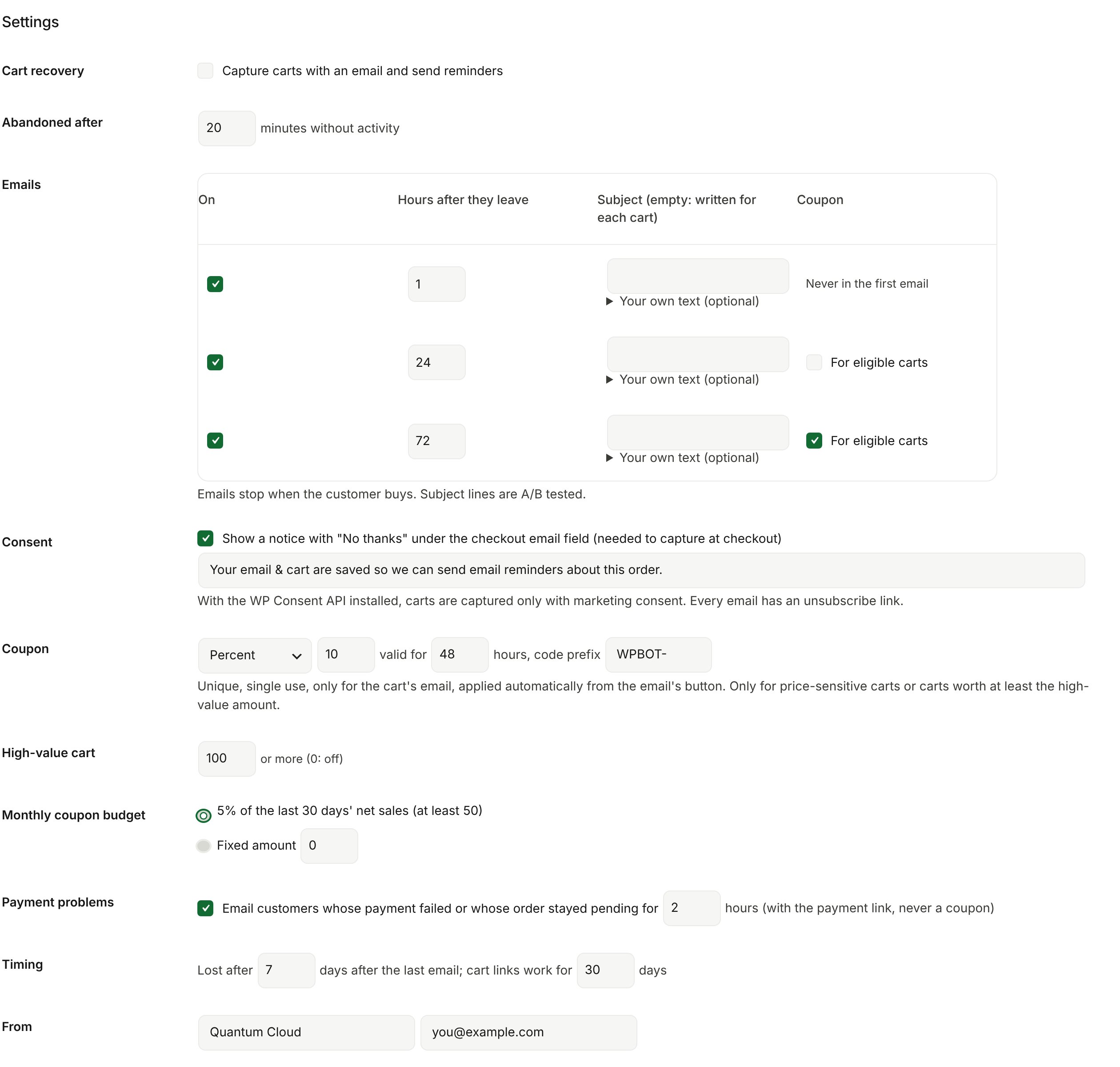
Cart recovery settings: emails, consent, coupon and budget.
| Setting | What it does |
|---|---|
| Cart recovery | Capture carts with an email and send reminders. |
| Abandoned after | Minutes without activity before a cart counts as abandoned. |
| Emails | Up to three emails: On, Hours after they leave, Subject (empty: written for each cart), Your own text (optional) and Coupon (For eligible carts; never in the first email). Emails stop when the customer buys. Subject lines are A/B tested. |
| Consent | Show a notice with "No thanks" under the checkout email field (needed to capture at checkout), with your own text. With the WP Consent API installed, carts are captured only with marketing consent. Every email has an unsubscribe link. |
| Coupon | Percent or Fixed amount, how many hours it is valid, and a code prefix. Coupons are unique, single use, only for the cart's email, and applied from the email's button. Only price-sensitive carts or carts worth at least the high-value amount get one. |
| High-value cart | The cart value from which a coupon is allowed (0: off). |
| Monthly coupon budget | 5% of the last 30 days' net sales (at least 50) or a Fixed amount. Over budget, emails go out without a coupon. The budget is shared with automation offers. |
| Payment problems | Email customers whose payment failed or whose order stayed pending for … hours (with the payment link, never a coupon). |
| Timing | Lost after … days after the last email; cart links work for … days. |
| From | Sender name and address. |
| Weekly report | Email the week's numbers on Mondays. |
| Webhook | A JSON POST when a cart is abandoned, recovered or lost (Zapier compatible). |
When Subject or the text is empty, the email is written for each cart by AI, with an honesty check.
Best practice
- Turn the consent notice on. Without it, carts cannot be captured at checkout.
- First email after about an hour, no coupon. Many shoppers just got distracted.
- Coupon only in the last email, for eligible carts. You keep your margin on carts that would have converted anyway.
- Watch Results per email and adjust timing.
Returning visitors with a saved cart can also be reminded in the chat (Season planner setting Remind returning visitors of their saved cart in the chat).
Availability
In Master and Professional, with the WooCommerce module. Not in Starter or WPBot Free.
Was this article helpful?
Sorry about that. Get help another way:











