

AI Writer settings: AI provider, budget and writing defaults
On this page
Open WPBot Pro → AI Writer → Settings & AI Provider (under More ▾). Only users who may change AI Writer's settings see this tab.
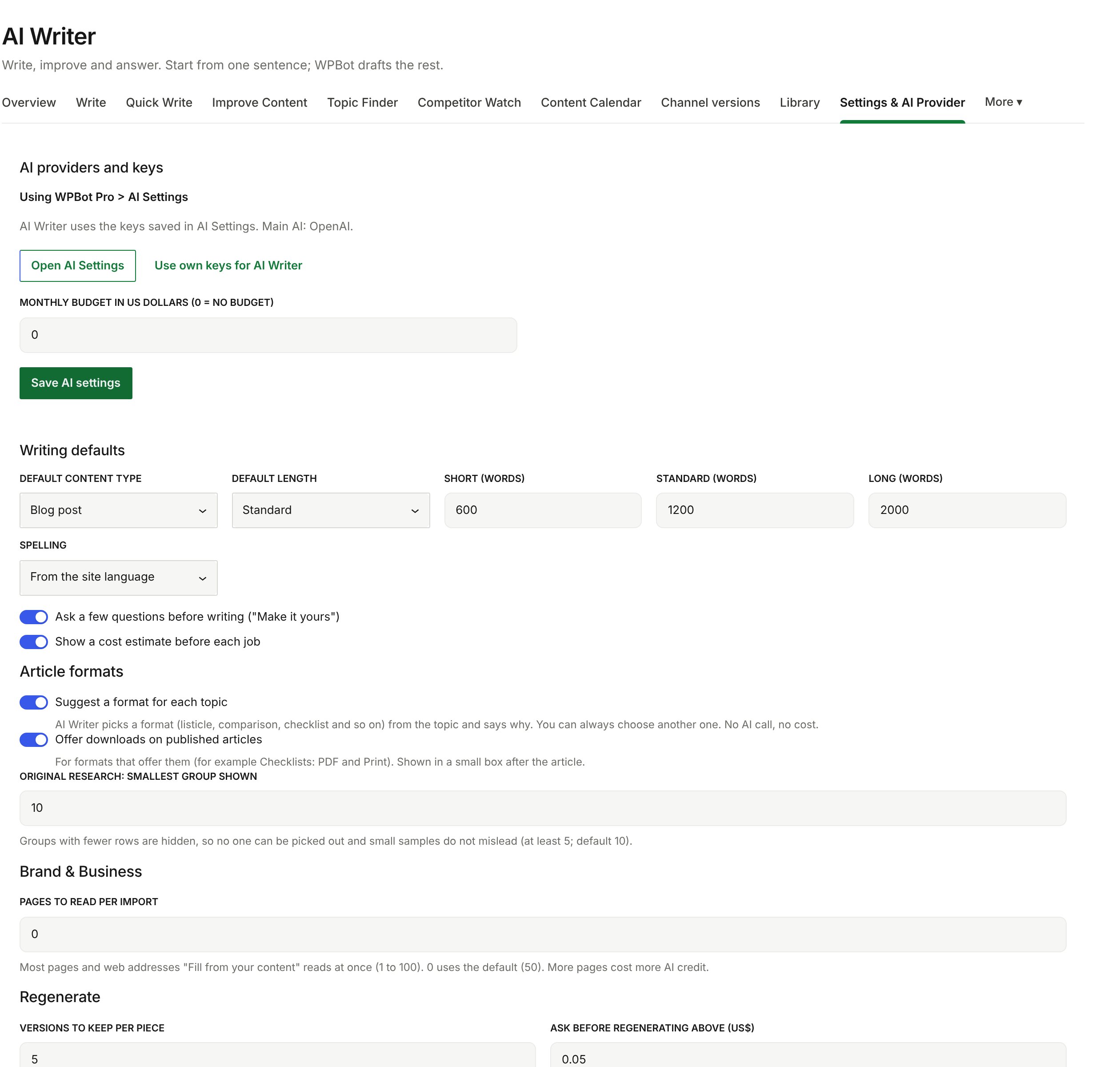
AI providers and keys, budget, writing defaults and article formats.
AI providers and keys
By default AI Writer uses the keys saved in WPBot Pro → AI / Settings ("Using WPBot Pro > AI Settings"), and says which provider is the main AI. Open AI Settings takes you there. See Choose your AI provider and add your key.
- Use own keys for AI Writer gives AI Writer its own provider and keys, for example to bill writing to a separate account. Keys are stored on your server, shown only as their last 4 characters, and never sent to the browser.
- MONTHLY BUDGET IN US DOLLARS (0 = NO BUDGET): the most AI Writer may spend in a month. Click Save AI settings.
The global and per-feature limits in AI / Settings → Spending and limits apply too. See Set AI spending limits and alerts.
Writing defaults
| Setting | What it does |
|---|---|
| DEFAULT CONTENT TYPE | Blog post, Help article, FAQ, Page copy or Product. |
| DEFAULT LENGTH | Short, Standard or Long. |
| SHORT (WORDS), STANDARD (WORDS), LONG (WORDS) | What each length means. Defaults: 600, 1200 and 2000. |
| SPELLING | From the site language, US English or UK English. |
| Ask a few questions before writing ("Make it yours") | The questions step before the outline. On by default. |
| Show a cost estimate before each job | Shows the estimated cost on the brief and before jobs. |
Article formats
- Suggest a format for each topic: AI Writer picks a format from the topic and says why. No AI call, no cost.
- Offer downloads on published articles: for formats that offer them, for example Checklists as PDF and Print.
- ORIGINAL RESEARCH: SMALLEST GROUP SHOWN: groups with fewer rows are hidden (at least 5; default 10).
See Article formats, real data and downloads.
Brand & Business, Regenerate and models
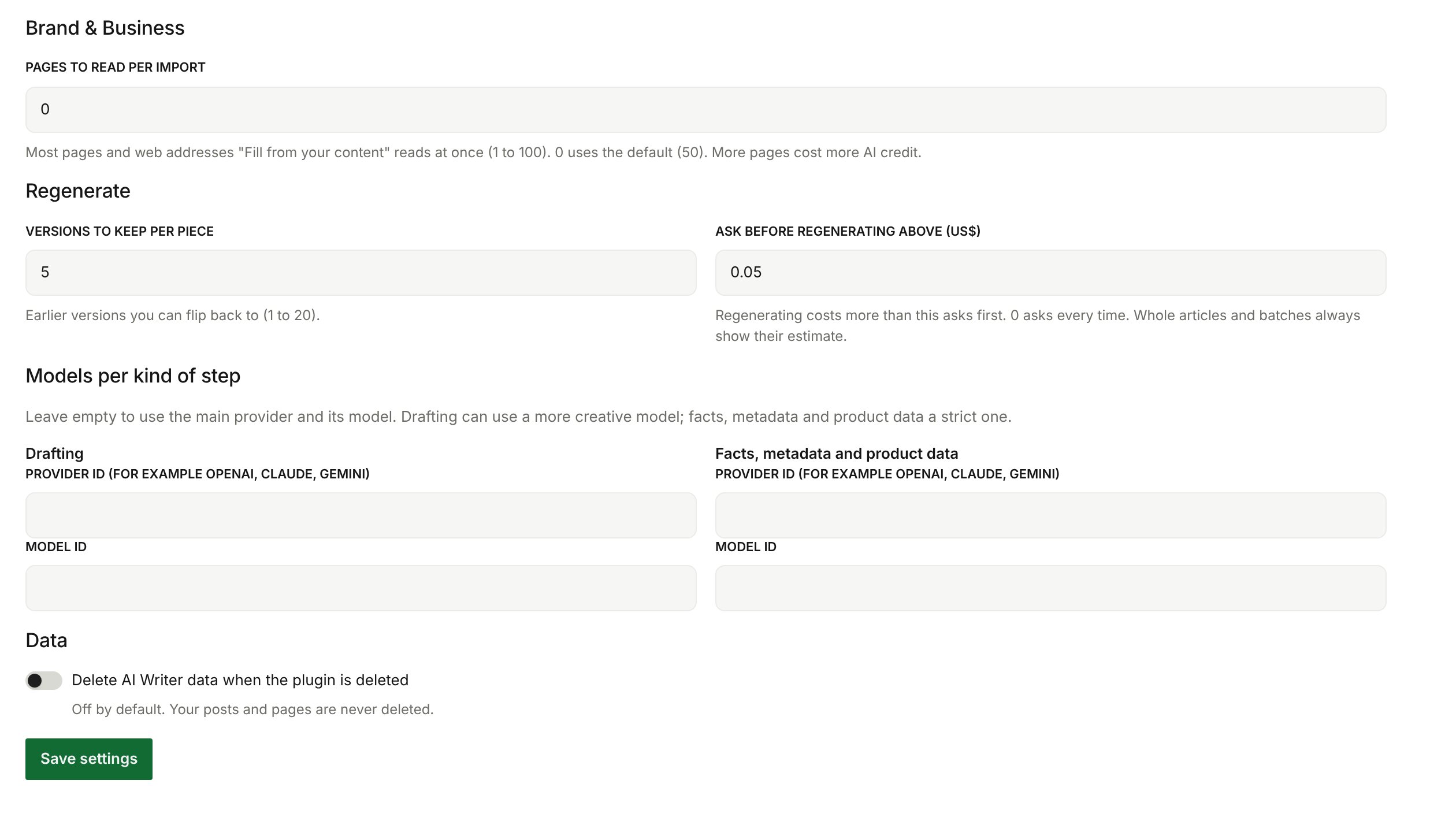
Import, Regenerate, models per kind of step and data.
| Setting | What it does |
|---|---|
| PAGES TO READ PER IMPORT | Most pages and web addresses "Fill from your content" reads at once (1 to 100). 0 uses the default (50). More pages cost more AI credit. |
| VERSIONS TO KEEP PER PIECE | Earlier versions you can flip back to (1 to 20, default 5). |
| ASK BEFORE REGENERATING ABOVE (US$) | Regenerating that costs more asks first (default $0.05). 0 asks every time. Whole articles and batches always show their estimate. |
| Models per kind of step | Leave empty to use the main provider and its model. Drafting can use a more creative model; Facts, metadata and product data a strict one. Enter a PROVIDER ID (for example openai, claude, gemini) and a MODEL ID. |
| Delete AI Writer data when the plugin is deleted | Off by default. Your posts and pages are never deleted. |
Click Save settings.
Tip
To save money, keep a "Best value" model as the main AI and set a stricter, cheaper model for Facts, metadata and product data. Use your best model only for Drafting if drafts need more life.
More settings on this tab
- Images and sources: see Images in AI Writer: Media Library, stock photos and AI images.
- Topic Finder: see Topic Finder: what to write next.
- Connections (Search Console and YouTube): see Connect Google Search Console and YouTube to AI Writer.
- Check that background jobs work: long writing jobs run in small steps. Run a test job runs a few quick steps without AI; Run a test job with one AI call also checks your AI connection. Use it if writing jobs seem stuck.
Availability
Every setting on this page is in every edition, including WPBot Free.
Was this article helpful?
Sorry about that. Get help another way:











