

Design the chat window
Open WPBot Pro → ChatBot → Customize ChatBot Design. The Chat window designer lets you pick a design, then fine-tune it. The preview under the designer shows your own site with the chat open, so you see every change on your real pages.
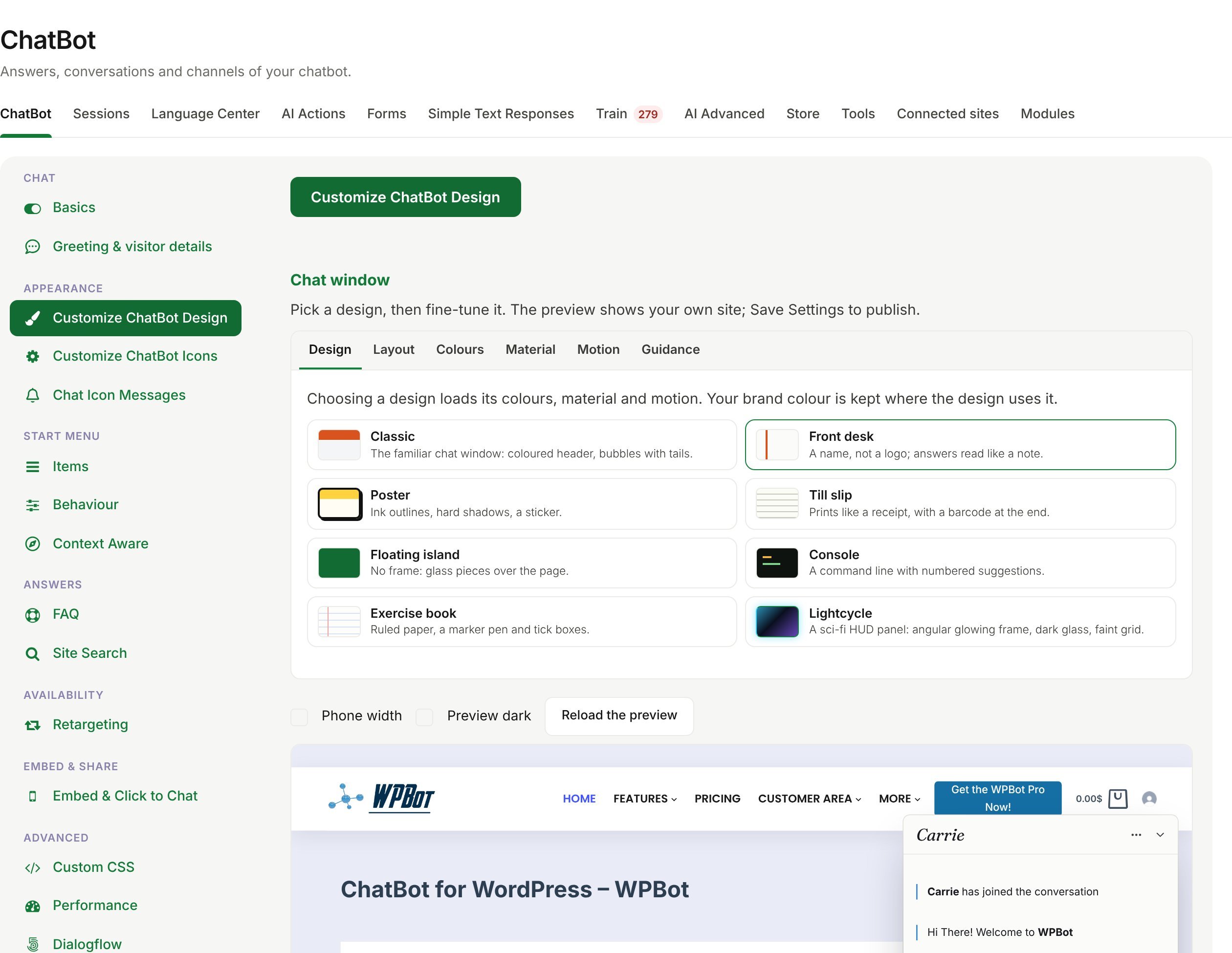
The chat window designer: the designs above, your own site in the preview below.
The eight designs
| Design | Looks like |
|---|---|
| Classic | The familiar chat window: coloured header, bubbles with tails. |
| Front desk | A name, not a logo; answers read like a note. |
| Poster | Ink outlines, hard shadows, a sticker. |
| Till slip | Prints like a receipt, with a barcode at the end. |
| Floating island | No frame: glass pieces over the page. |
| Console | A command line with numbered suggestions. |
| Exercise book | Ruled paper, a marker pen and tick boxes. |
| Lightcycle | A sci-fi panel: angular glowing frame, dark glass, faint grid. |
Choosing a design loads its colours, material and motion. Your brand colour is kept where the design uses it.
Fine-tune it
The tabs above the designs change one part each:
| Tab | What you set | Guide |
|---|---|---|
| Design | The design | This article |
| Layout | Floating, Compact or Side panel; side, width, height, corners | Chat window layout and colours |
| Colours | Light or dark, brand colour, both palettes | Chat window layout and colours |
| Material | Solid or glass, header style, background, fonts | Chat window material, fonts and motion |
| Motion | Opening, messages, thinking indicator, send button | Chat window material, fonts and motion |
| Guidance | Suggestions, follow-up buttons, start menu bar, three-dot menu | Guide visitors in the chat window |
Under the preview, Phone width shows the window at phone size, Preview dark shows the dark palette, and Reload the preview starts the preview again.
Note
The preview shows your changes at once, but visitors see them only after you click Save Settings.
Choose the right design
- Classic or Front desk fit most business sites, shops and service companies.
- Floating island suits modern, image-led sites; it lets the page show through.
- Console and Lightcycle suit tech, gaming and developer audiences.
- Poster, Till slip and Exercise book give strong personality to creative brands, restaurants, shops and schools.
Check the result in both light and dark and at phone width: most visitors open the chat on a phone.
Below the designer you also find Show Bot on a Page (the [wpbot-page] shortcode, see Embed the chatbot and add Click to Chat buttons) and the chat window's buttons and texts (Chat window buttons: reactions, report, share, reset and close).
Availability
Classic and Front desk, the Floating layout and the basic options are in every edition, including WPBot Free. The six other designs, the Compact and Side panel layouts, Liquid glass, backgrounds inside the window, and most motion and guidance options are in every WPBot Pro edition (Starter, Professional and Master). In WPBot Free, clicking a Pro design shows a picture of it instead of the preview.
Was this article helpful?
Sorry about that. Get help another way:











