

Form analytics: find the field where people give up
Open Site Insight → Forms: how visitors fill in your forms. Only field names and timings are collected; what visitors type is never collected, whatever the field.
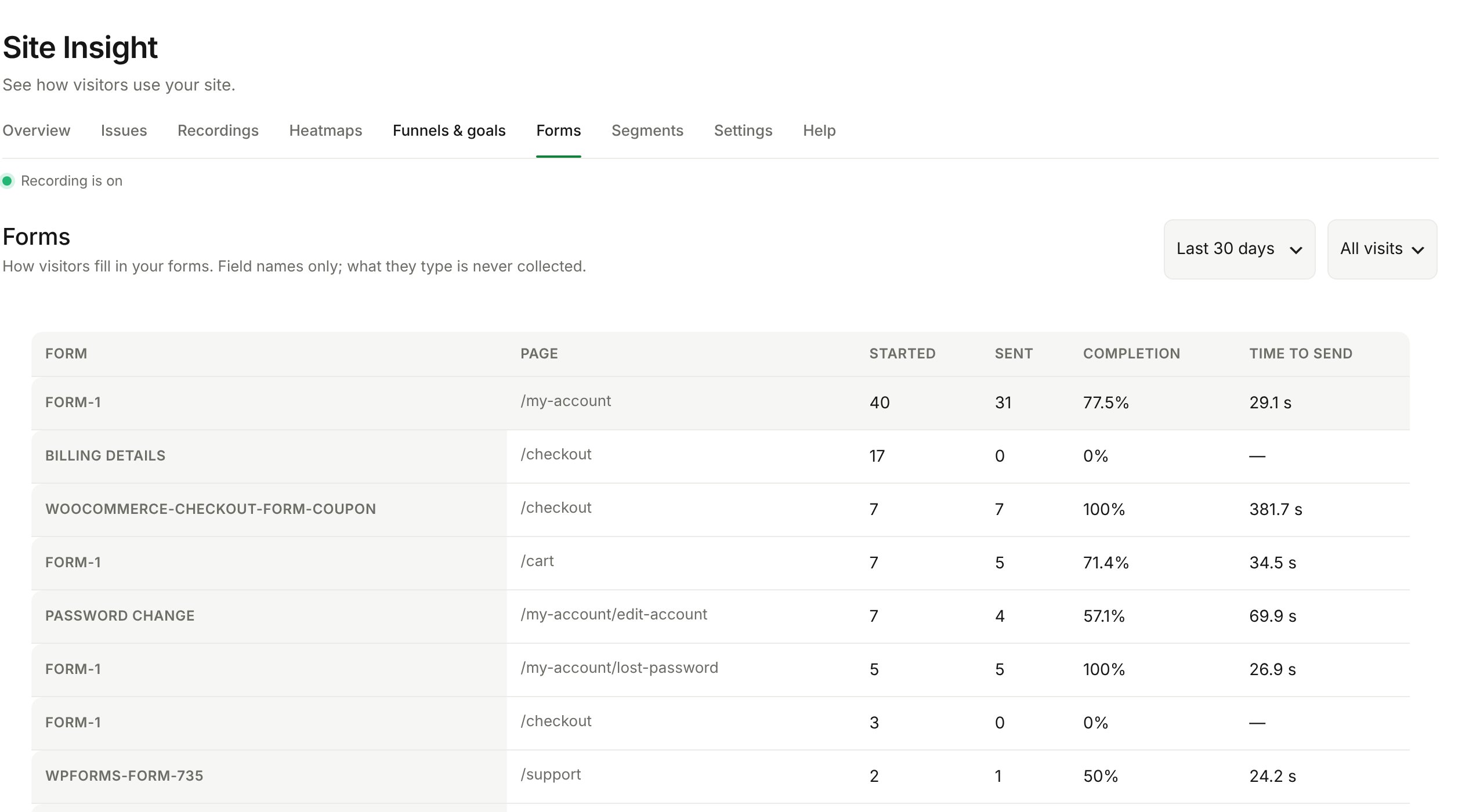
The Forms screen: each form with started, sent, completion and time to send.
The forms list
| Column | What it shows |
|---|---|
| Form | The form's id or name attribute |
| Page | Where the form was used |
| Started | Visits that began filling it in |
| Sent | Visits that sent it |
| Completion | Sent out of started |
| Time to send | Average time from the first field to sending |
Choose the Date range and a segment at the top.
Open a form
Click a form to see each field:
| Column | Meaning |
|---|---|
| Visitors | How many visitors used the field |
| Average time | Time spent in it |
| Came back to it | Returns to the field after leaving it, which often means it is confusing |
| Filled in | How often it was filled in |
| Gave up here | The last field used before leaving without sending the form |
Watch who left without sending opens those recordings.
Fix forms that lose leads
- Remove the field with the most "Gave up here" if you can live without it, or make it optional.
- Explain fields people come back to. Add an example or a short hint under the label.
- Shorten long forms. Ask for an email first; ask for the rest later.
- Check mobile. Choose a mobile segment: forms often break on small screens.
Tip
Forms are told apart by their id or name attribute. Give important forms an id (for example id="quote-form") so they are easy to recognise in the list.
The Form abandonment signal marks each visit where someone started a form and left the page without sending it. See Frustration signals: rage clicks, dead clicks and more.
Availability
Form analytics and the Form abandonment signal need Site Insight Pro: Professional and Master. Starter and WPBot Free do not have them.
Was this article helpful?
Sorry about that. Get help another way:











