

Write social posts with AI
On this page
Open WPBot Pro → Social → Create post → Write with AI. Start from anything; WPBot writes a version for each network.
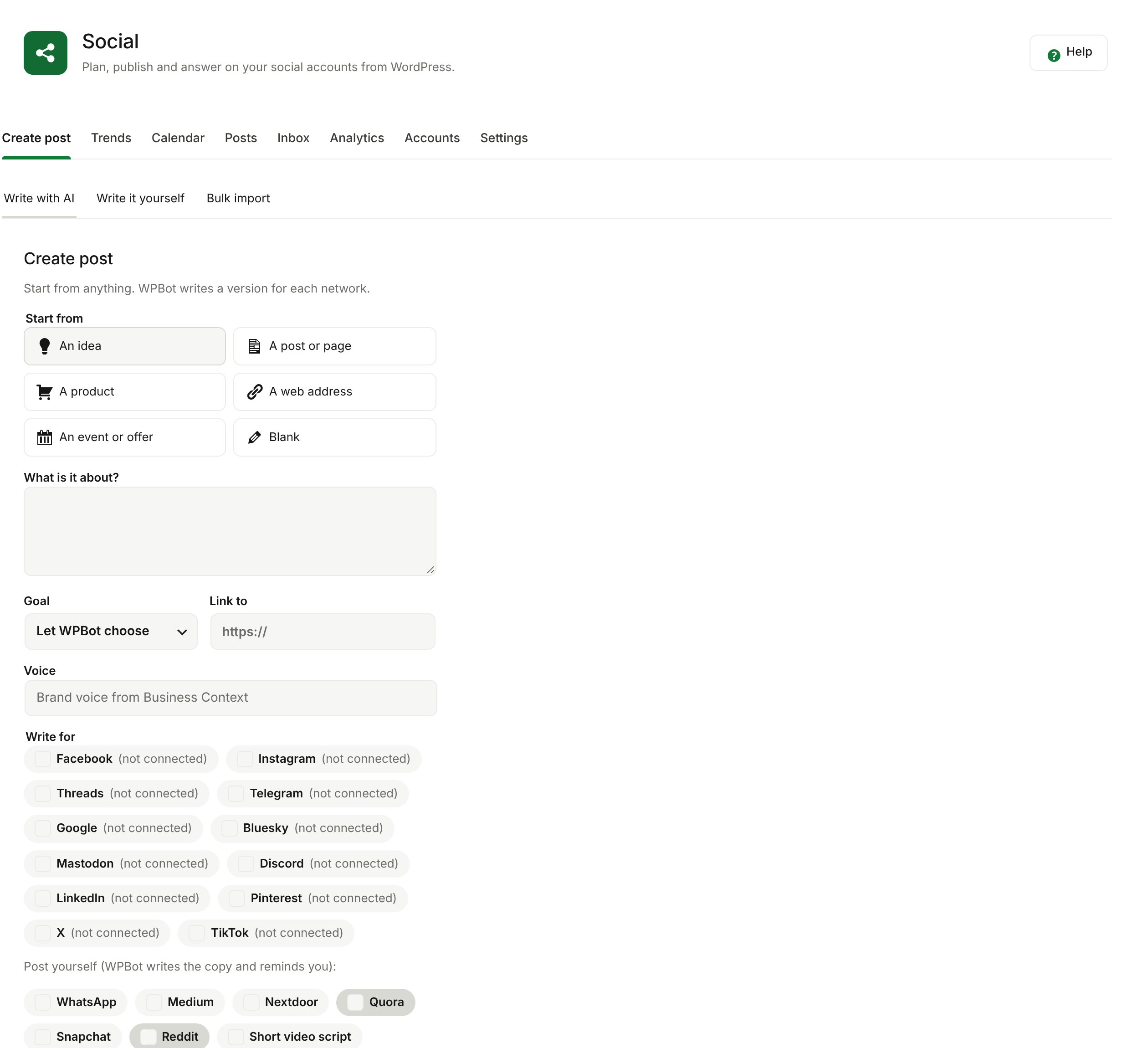
Write with AI: what the post starts from, the goal, the link, the voice and the networks.
1. Choose what it starts from
| Start from | What you give |
|---|---|
| An idea | What is it about? in a sentence or two |
| A post or page | A published post or page; WPBot reads it and links to it |
| A product | A WooCommerce product |
| A web address | Any address |
| An event or offer | Event or offer, When, Where, Offer, Code and Ends |
| Blank | Nothing: no AI call, no cost. You write the text yourself |
2. Choose the goal and the link
Goal steers the wording: Let WPBot choose, Awareness, Engagement, Visits to the site, Sales or Event sign-ups. Link to sets the page the posts link to.
Tip
For traffic and sales, choose Visits to the site or Sales and link to the page where people buy or sign up. Links to your site get tracking tags automatically.
3. Voice and brand
- Voice: leave it empty to use the brand voice from Business Context, or type one for this post.
- Brand: with brands set up, choose one to use its voice.
When Business Context has content, the screen shows Uses Business Context: facts, offers, "never say".
4. Choose the networks
Tick the networks under Write for. Networks without a connected account show (not connected): you can still write for them, but you need an account to schedule. Under Post yourself (WPBot writes the copy and reminds you) you can add networks that do not let apps post. See Post yourself: WhatsApp, Medium, Nextdoor, Quora, Snapchat and Reddit.
5. Write, check and continue
Click Write. Before it writes, WPBot shows an estimate of the AI calls and the cost, and what is left of Social's monthly AI budget.
Each version shows its Technique. You can edit it, click Rewrite, or pick one of the other versions WPBot offers with Use this one. Tick the versions you want and click Continue with selected: they open in Create post, where you add images and schedule them.
Note
The honesty check flags claims that are not in Business Context or the source, such as a price or a promise. A flagged version asks you to confirm before it can be scheduled.
Writing a long article?
AI Writer writes articles and can send their social versions here as drafts. See Getting started with AI Writer.
How each network's version is written
Length, link placement, hashtags, emojis and the technique per network are set in Settings → Writing. See Writing settings: AI, budget, voice, hashtags and each network's style.
Availability
Write with AI is in every edition, including WPBot Free, one network at a time. Master writes for all ticked networks at once, offers other versions to choose from, writes threads and carousel slides, uses brand voices, and adds the Post yourself networks Medium, Nextdoor, Quora, Snapchat, Reddit and the short video script.
Was this article helpful?
Sorry about that. Get help another way:











