

Use a cheaper model for short questions
On this page
Many chatbot messages are short: "hi", "opening hours?", "do you ship to Canada?". They do not need your best model. With this setting, short messages go to a cheaper model of the same provider, and longer questions use the model chosen above.
Set it up
- Open AI / Settings → Providers and scroll to Cheaper model for short questions.
- In SHORT MEANS UP TO … words, set how many words count as short (for example 8).
- For each provider with a key, choose the cheaper model, for example its ★ Cheapest model.
- Click Save settings.
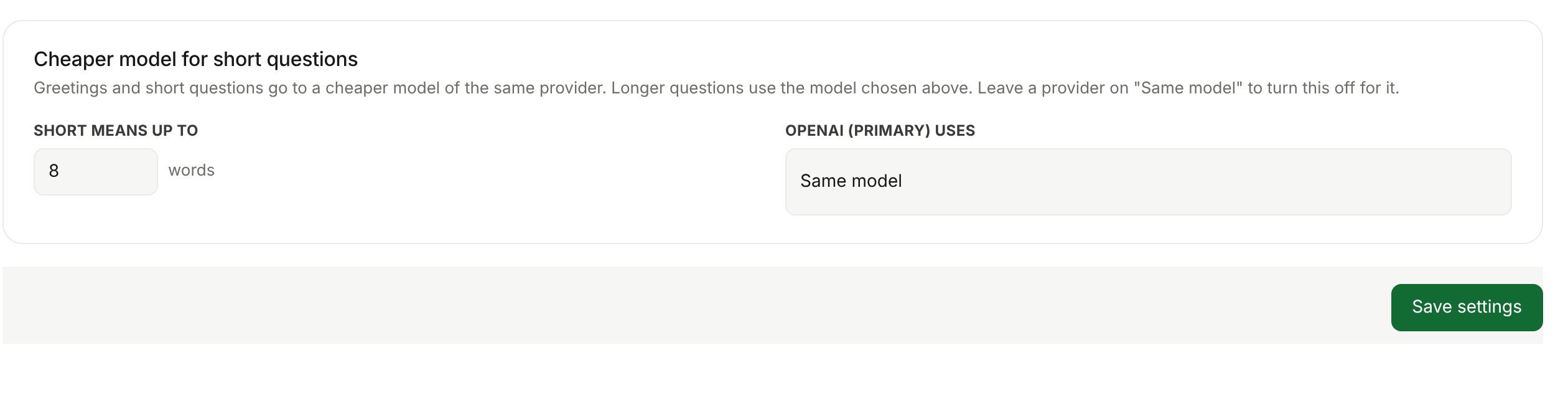
Choose how many words count as short, and the model for them.
Leave a provider on Same model to turn this off for it.
How much it saves
On a typical site a large share of messages are greetings or one-line questions. Moving them to a model that costs a fraction of your main one cuts the chatbot's AI bill noticeably, without changing the quality of real answers. Check the result in AI Usage → By model after a week. See Read the AI Usage report.
Tips
- Start with 6 to 10 words.
- If short answers become too vague, lower the number or choose the provider's Best value model as the cheap one.
- The Answer cache: free, instant answers to repeated questions saves even more: repeated questions cost nothing at all.
Availability
In every edition, including WPBot Free.
Was this article helpful?
Sorry about that. Get help another way:











