

Let your customers’ AI assistants read your docs
More and more customers ask an AI assistant instead of searching. The public docs server gives those assistants your official answers. It is a public, read-only address that Claude, ChatGPT, Cursor and other assistants can connect to, so your customers get answers from your published articles with links to them.
Open WPBot Pro → Help Center → AI & GitHub → Let your customers' AI assistants read your docs.
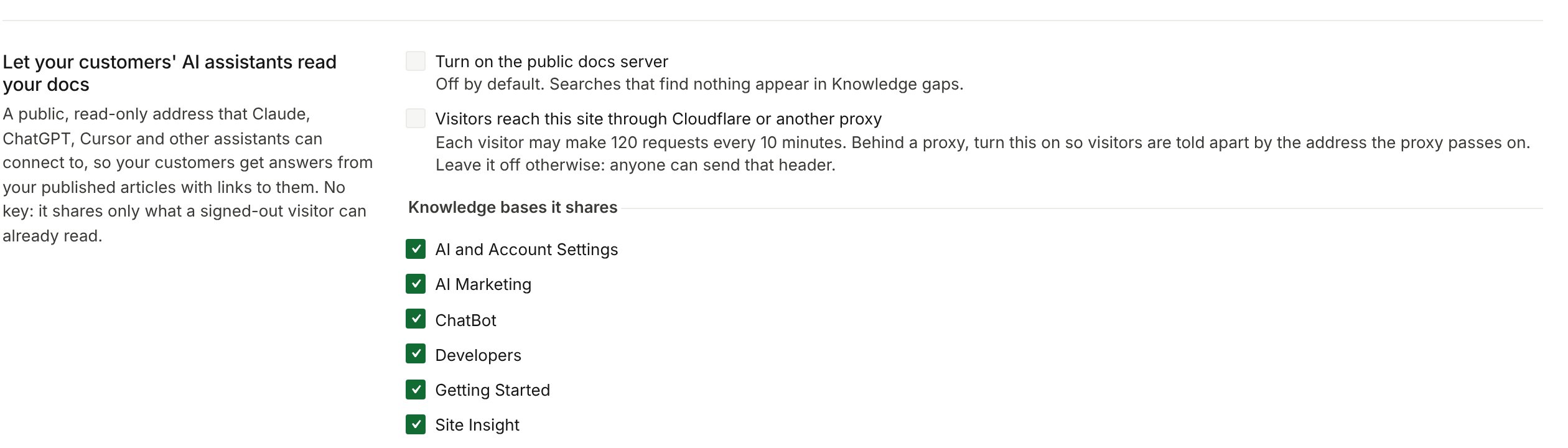
The public docs server settings.
Turn it on
- Tick Turn on the public docs server. It is off by default.
- Under Knowledge bases it shares, untick any knowledge base you want to keep out (shown when you have more than one with articles).
- Tick Visitors reach this site through Cloudflare or another proxy only if your site is behind such a proxy.
- Click Save.
The section then shows the Server address (ending in /wp-json/wpbot-help/v1/docs) and a Claude Code command to copy. In Claude.ai or ChatGPT, customers add the address as a custom connector. Share it on your help center or in your developer docs; it is also listed in your Help Center's llms.txt.
What it shares
- Only published articles without a password that a signed-out visitor can already read. No key is needed, and nothing private is shared.
- Assistants can search your docs (with typo correction), read an article as Markdown, and list topics (knowledge bases, categories and article links).
- Responses tell search engines not to index them.
Limits
Each visitor may make 120 requests every 10 minutes, and the whole server at most 3,000 every 10 minutes. Behind Cloudflare or another proxy, turn on the proxy option so visitors are told apart by the address the proxy passes on. Leave it off otherwise: anyone can send that header.
What you learn from it
- Searches from AI assistants that find nothing appear in Knowledge Gaps as "AI assistant found nothing in your docs".
- Analytics has a From AI assistants section: searches, searches with no result and articles read through the docs server.
Developers find the tool details in Public docs server for your customers' AI assistants.
Availability
In every edition, including WPBot Free.
Was this article helpful?
Sorry about that. Get help another way:











