

Let Claude build your docs from GitHub: prompt, drafts, suggestions and change log
On this page
Once Claude is connected (see Connect Claude Code or Claude Desktop to your Help Center), it can read your GitHub repository and write your help center: knowledge bases, categories and customer-friendly articles. Run it again after each release and it updates the same articles instead of making duplicates.
2. Tell Claude what to build
On WPBot Pro → Help Center → AI & GitHub, enter your GitHub repository address. The Prompt below it fills in the address; click Copy and paste it into Claude.
The prompt asks Claude to:
- Read the repository: README, docs, readme.txt, the changelog, settings screens and help texts, shortcodes and blocks, and skip code customers never see, keys, vendor and build folders.
- Read your current structure, then propose knowledge bases, categories and articles, and wait for your OK.
- Create them and write each article in Markdown for customers: what it is for, numbered steps, where to click, tips and warnings, with the GitHub path and commit as the source.
- Use stable slugs, so running it again updates the articles.
- Check your knowledge gaps and write articles for the questions visitors asked.
- Finish with a list of what it created.
Claude reads the repository with its own GitHub access (in Claude Code, the gh command).
3. Review: drafts or auto-publish
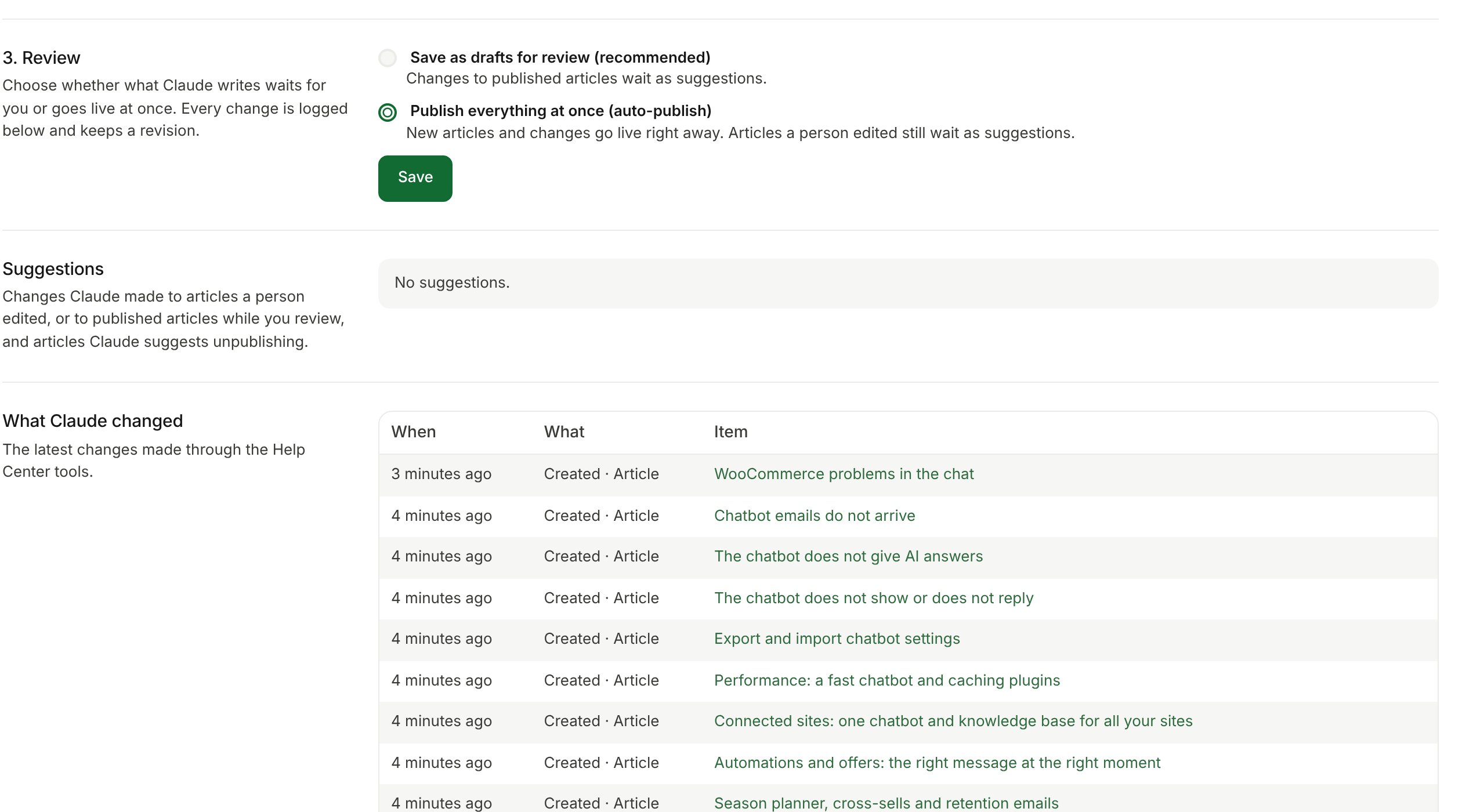
Review: drafts or auto-publish, suggestions and what Claude changed.
Under New articles from Claude, choose:
| Option | What happens |
|---|---|
| Save as drafts for review (recommended) | New articles wait as drafts. Changes to published articles wait as suggestions. |
| Publish everything at once (auto-publish) | New articles and changes go live right away. Articles a person edited still wait as suggestions. |
Click Save. With drafts, Review drafts opens them and Publish all AI drafts publishes them in one go.
Suggestions
Suggestions lists changes Claude made to articles a person edited, or to published articles while you review, and articles Claude suggests unpublishing. For each New version from Claude, click Apply or Dismiss. Claude never deletes anything: at most it suggests unpublishing.
What Claude changed
What Claude changed lists the latest changes made through the Help Center tools: When, What (for example Created · Article, Updated, Suggested a change, Changed the order) and the Item. Every change also keeps a WordPress revision of the article.
Limits and safety
- Claude works with your WordPress account's rights in the Help Center.
- Writes are limited to 600 an hour per user.
- Markdown is turned into Help Center blocks; raw HTML and unsafe links are dropped.
The tools Claude uses
| Tool | What it does |
|---|---|
helpcenter_get_structure | Knowledge bases, categories and articles |
helpcenter_search, helpcenter_get_article | Find and read articles (as Markdown) |
helpcenter_upsert_knowledge_base, helpcenter_upsert_category, helpcenter_upsert_article | Create or update, matched by slug |
helpcenter_set_order | Change the order |
helpcenter_list_gaps | Questions visitors asked that found no answer |
helpcenter_propose_unpublish | Suggest unpublishing an article |
helpcenter_get_changes | The change log |
The same tools are available as WordPress Abilities for the WordPress MCP Adapter. See Help Center MCP server: let AI assistants write your docs.
Use it to grow
- Run it after every release, so the docs always match the product.
- Let it answer your knowledge gaps: each published answer is a question the chatbot can answer and a page that can rank.
- Keep Save as drafts for review until you trust the results, and read each article before publishing.
Availability
In every edition, including WPBot Free. You need Claude Code or Claude Desktop with access to your repository.
Was this article helpful?
Sorry about that. Get help another way:











