

Retargeting: open the chat at the right moment
On this page
Open WPBot Pro → ChatBot → Tools → Retargeting. The tabs are General Settings, Exit Intent, Scroll Intent, Auto After "X" Seconds and Complete Checkout.
Note
In WPBot Pro, these triggers run as rules in ChatBot → Store → Automations. Saving this page updates those rules. Fine-tune them there: pages, schedule, buttons and results. See Automations and offers: the right message at the right moment.
General Settings: attention effects
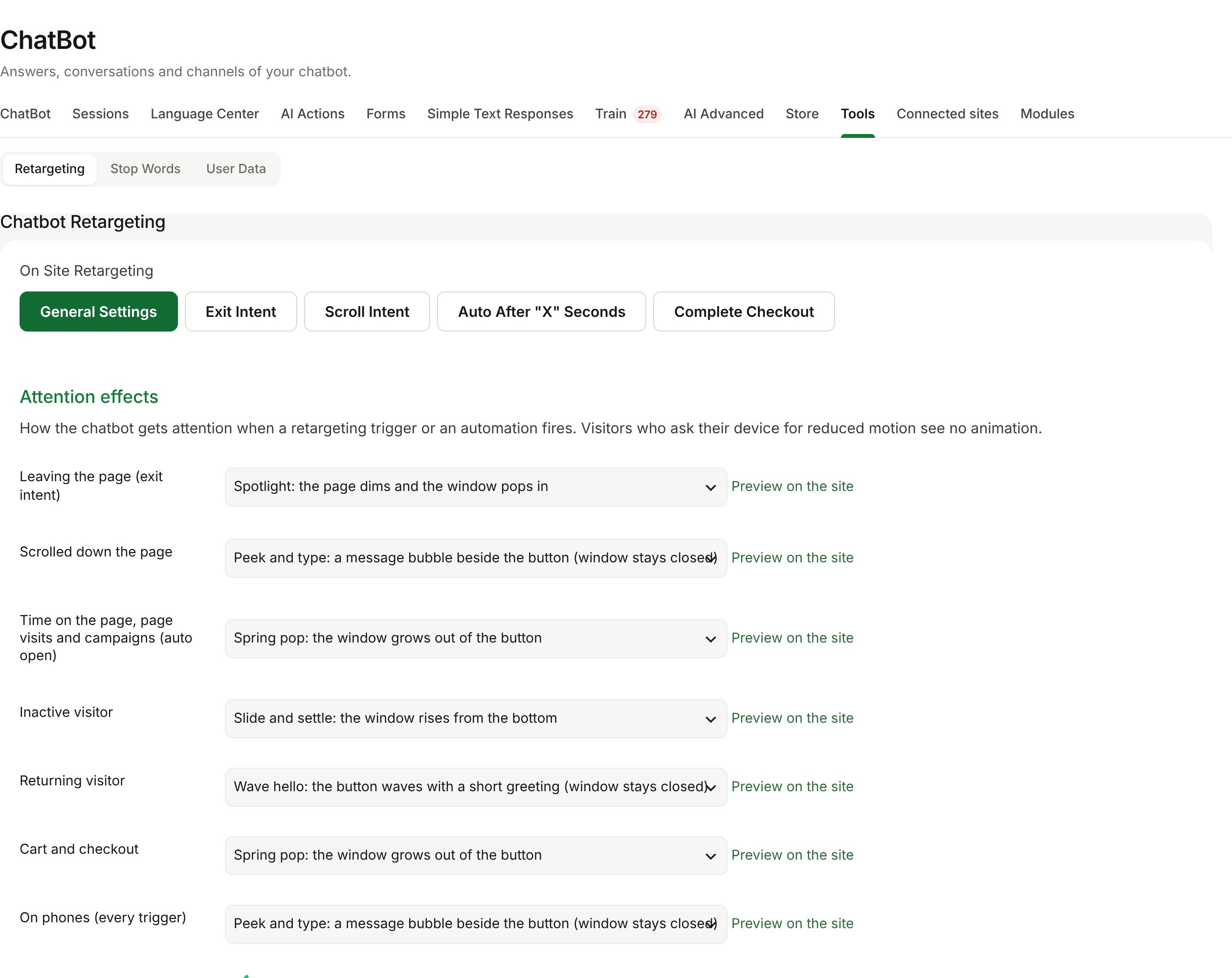
Attention effects for each kind of trigger, sound and tab title.
Under Attention effects, choose how the chatbot gets attention for each kind of trigger: Leaving the page (exit intent), Scrolled down the page, Time on the page, page visits and campaigns (auto open), Inactive visitor, Returning visitor, Cart and checkout, and On phones (every trigger).
| Effect | What visitors see |
|---|---|
| Spring pop | The window grows out of the button. |
| Slide and settle | The window rises from the bottom. |
| Spotlight | The page dims and the window pops in. |
| Light sweep | Light runs around the window border. |
| Peek and type | A message bubble beside the button; the window stays closed. |
| Wave hello | The button waves with a short greeting; the window stays closed. |
| No effect | The window just opens. |
Preview on the site shows the effect on your site. Visitors who asked their device for reduced motion see no animation.
Tip
On phones, a quiet effect such as Peek and type works best: it invites without covering the page.
More general settings:
- Visitor on another tab: Flash the tab title and put a red dot on the site icon until the visitor comes back.
- Hello (When available, we will use user name): the greeting before the message.
- Retargeting message container background color.
- Retargeting Sound: play a sound when a message opens.
- Window Focus Title: add a short message to the page title, set in Custom Meta Title.
Exit Intent
Shows a message when the mouse pointer leaves the browser window, a sign the visitor is about to leave.
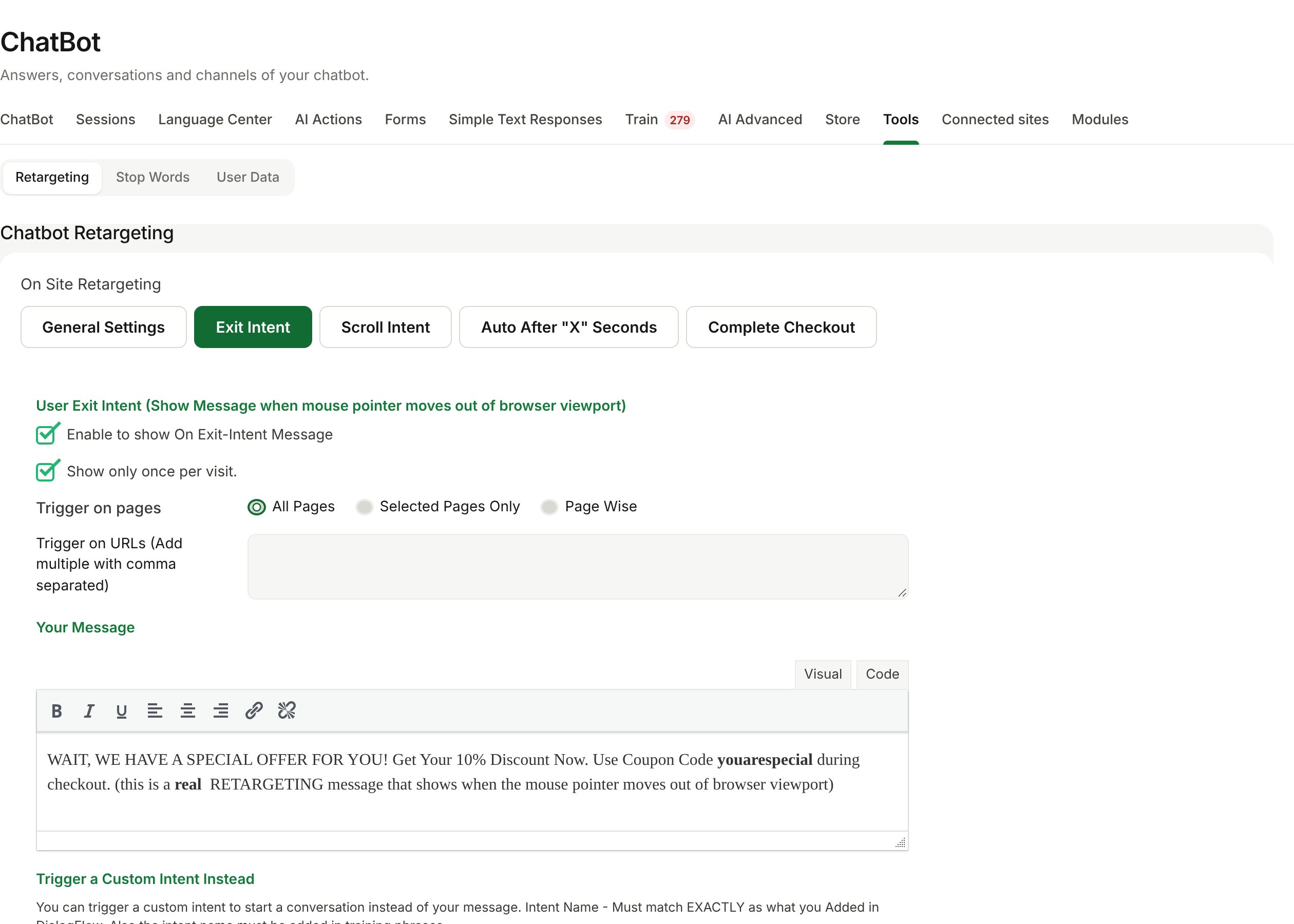
Exit Intent: where it shows and what it says.
- Enable to show On Exit-Intent Message and Show only once per visit.
- Trigger on pages: All Pages, Selected Pages Only or Page Wise. Page Wise lets you set a different message, or an intent, per page.
- Trigger on URLs (Add multiple with comma separated).
- Your Message: the text, with bold, italic and links. For example a coupon code, a free guide or a "Talk to us before you go".
- Trigger a Custom Intent Instead: start a Dialogflow intent by its exact name.
- Trigger Email Subscription Intent Instead: ask for the visitor's email.
Scroll Intent
The same options, plus WPBot will be shown after scrolling down … percent. A visitor who scrolled 70 to 80 percent of an article is interested: offer the next step.
Auto After "X" Seconds
The same options, plus WPBot will be opened automatically after … seconds. Use it on pricing and product pages, where a visitor who stays a while often has a question.
Complete Checkout
With the WooCommerce module on:
- Show message to complete checkout (when user has products in the cart) with Your Message.
- Show message when the user returns to the site.
- Show message when user inactive., with Chatbot will be opened for inactive user after … seconds and Show only once per visit for inactive users.
Without the WooCommerce module, this tab shows a link to Open Modules.
Click Save Settings at the bottom.
Tips for more leads and sales
- One message per visit. Tick Show only once per visit. everywhere.
- Match the message to the page. Use Page Wise for your top pages: a discount on product pages, a guide on blog posts, a call on service pages.
- Ask for something small. An email or one question converts better than a long form.
- Measure. Store → Automations → Results shows visitors shown, orders after and, with a holdout group, the real lift.
Availability
Retargeting is in every WPBot Pro edition (Starter, Professional and Master). The Complete Checkout messages and the store triggers need the WooCommerce module, in Professional and Master. WPBot Free does not include Retargeting.
Was this article helpful?
Sorry about that. Get help another way:











