

Topic Finder: what to write next
Topic Finder answers the question every content plan starts with: what should we write next? It reads your own data, finds topics people want and your site does not cover yet, and ranks them.
Open WPBot Pro → AI Writer → Topic Finder.
Sources
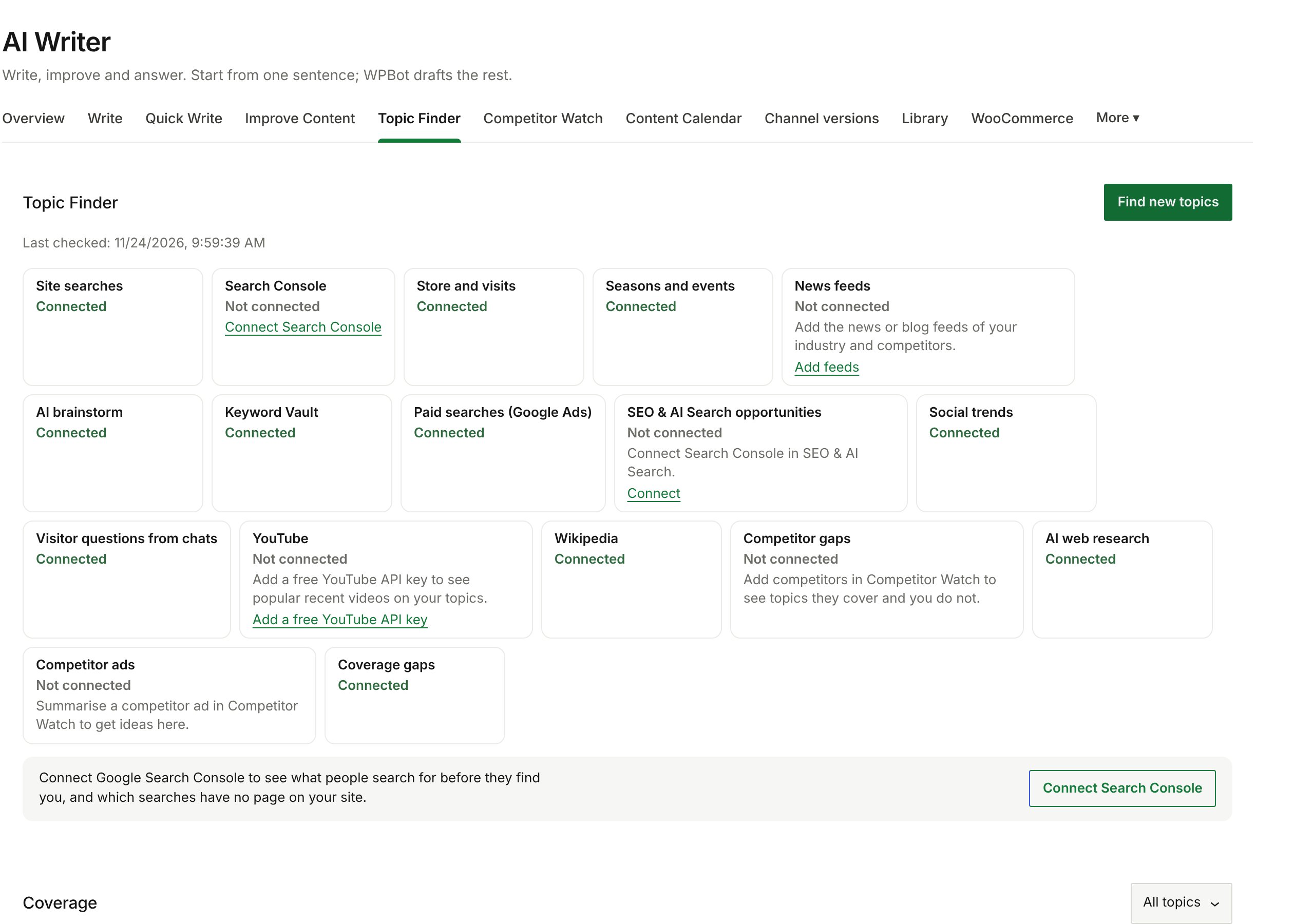
Each source shows whether it is connected and what to do if it is not.
| Source | What it adds |
|---|---|
| Site searches | What visitors search for on your site, especially searches that found nothing. |
| Search Console | Rising Google searches and searches with no matching page. |
| Store and visits | Best sellers and top landing pages. |
| Seasons and events | Holidays, shopping days and your own store events in the next 60 days. |
| News feeds | New posts and news from feeds you follow (headlines and links only). |
| AI brainstorm | Ideas from what your site is about. |
| Keyword Vault | Keywords you marked Targeted in SEO & AI Search that have no page yet, with their search numbers. |
| Paid searches (Google Ads) | Searches people click in your ads and buy from, with no page of yours ranking. |
| SEO & AI Search opportunities | Searches with no matching page and pages close to page one, from your Search Console data. |
| Social trends | Rising topics from Social → Trends that fit your site, and the ones you saved or watch. |
| Visitor questions from chats (Pro) | What visitors ask your chatbot, grouped, with names and contact details removed. See Turn chatbot questions into articles. |
| YouTube (Pro) | Popular recent videos on your topics (titles and counts only). Needs a free YouTube API key. |
| Wikipedia (Pro) | Rising and seasonal public interest, and related subtopics. |
| Competitor gaps (Pro) | Topics your competitors cover and you do not (titles only, never their text). |
| AI web research (Pro) | What is new or trending on your topics, with source links (a model with web search, your key). |
| Competitor ads (Pro) | Ideas from competitor ads you summarised in Competitor Watch. |
| Coverage gaps (Pro) | Subtopics your topic map says are missing from your site. |
A source that is Not connected says what it needs, with a link: Connect Search Console, Add feeds or Add a free YouTube API key.
Click Find new topics to refresh. By default Topic Finder refreshes every week.
Ranked topics
Each idea shows:
- the title and the source(s) it came from, for example "Store and visits + AI brainstorm"
- a trend: Rising, Steady or Seasonal
- Relevance to your site, in percent
- a suggested Format, for example "Format: Checklist"
- Not covered yet, or Covered by: the page that already covers it
- the reason, for example "Searched 7 times on your site in four weeks; 7 found nothing." or "In 38 days (2027-01-01). Publish two to four weeks ahead so it can be found in time."
Actions: Write (opens a brief), Add to calendar, Dismiss and, where there is one, Open the source.
In Pro, ideas found by several sources rank higher, and topics that clearly earned visits, leads or orders in Results rank higher too.
Tip
Start with ideas from Site searches that found nothing and from your chats: people already asked, and your site had no answer.
Topic Finder settings
Open Settings & AI Provider → Topic Finder.
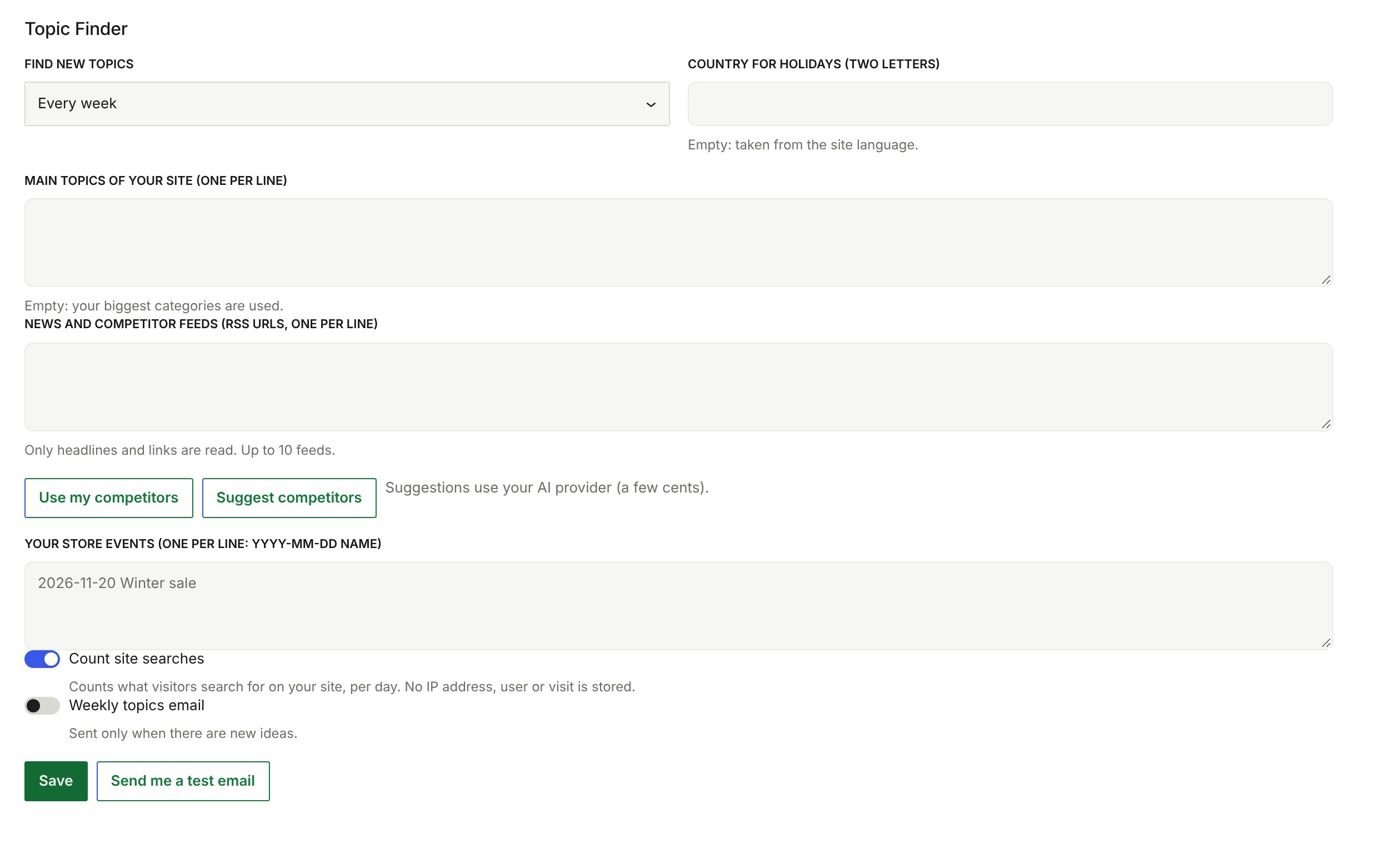
Topic Finder settings.
| Setting | What it does |
|---|---|
| FIND NEW TOPICS | Every week or Only when I click Refresh. |
| COUNTRY FOR HOLIDAYS (TWO LETTERS) | Which country's holidays to suggest. Empty: taken from the site language. |
| MAIN TOPICS OF YOUR SITE (ONE PER LINE) | What your site is about. Empty: your biggest categories are used. |
| NEWS AND COMPETITOR FEEDS (RSS URLS, ONE PER LINE) | Only headlines and links are read. Up to 10 feeds. Use my competitors adds your competitors' feeds; Suggest competitors uses your AI provider (a few cents). |
| YOUR STORE EVENTS (ONE PER LINE: YYYY-MM-DD NAME) | Your own sales and launches, for example 2026-06-01 Summer sale. |
| Count site searches | Counts what visitors search for on your site, per day. No IP address, user or visit is stored. |
| Weekly topics email | An email with new ideas, sent only when there are new ones. Send me a test email shows what it looks like. |
Availability
Topic Finder with Site searches, Search Console, Store and visits, Seasons and events, News feeds, AI brainstorm, Keyword Vault, Paid searches (Google Ads) and SEO & AI Search opportunities is in every edition, including WPBot Free. The sources marked (Pro) and the combined ranking are AI Writer Pro (Starter, Professional and Master). Social trends needs Social Pro, which is Master only. Paid searches need a Google Ads connection in SEO & AI Search.
Was this article helpful?
Sorry about that. Get help another way:











