

The chatbot answers slowly
Two different things can feel slow: the first open of the chat, and the answer to a question. Find yours below.
Slow answers
| Check | Why it matters | Where |
|---|---|---|
| Stream replies | With streaming, words appear as the AI writes them, so visitors see the answer start at once instead of waiting for the whole text | AI / Settings → Answers |
| Bot Response Delay | A pause WPBot adds before each reply, to feel like typing. Set it to 0 or 0.5 seconds | ChatBot → Basics → Bot Response Options |
| The model | Large and "thinking" models are slower. A Best value model answers most website questions well and fast | AI / Settings → Providers (Choose your AI provider and add your key) |
| Cheaper model for short questions | Greetings and one-line questions go to a small, fast model | Use a cheaper model for short questions |
| Answer cache | Repeated questions from visitors who are not logged in are answered instantly, at no AI cost | AI / Settings → Answer cache (Answer cache: free, instant answers to repeated questions) |
| Max Context Documents (Top K) | How many knowledge base pieces are sent with each question. More context means more text for the AI to read. The default is 5 | AI / Settings → Knowledge Base |
| LONGEST ANSWER (TOKENS) | A cap on answer length; long answers take longer | AI / Settings → Answers |
Other causes
- The primary provider is failing. If the primary times out before the backup answers, every answer waits. Check AI / Settings → Error log for failed requests, and fix the primary or switch providers. See No AI answers, or "Sorry, I can't answer that right now".
- A self-hosted Ollama server answers only as fast as its hardware. A small model or a GPU helps.
- The provider is busy. All providers slow down at peak times. A backup from another company helps when one is having problems.
- A slow server. Each answer is one request to your site and one to the provider. Shared hosting under heavy load adds seconds; ask your host whether PHP workers are maxed out.
A slow first open
To keep pages fast, WPBot first shows only the chat icon and loads the full chat on the first interaction with it. On a slow connection that first load can take a moment.
- Pointing at, touching or focusing the icon already starts the load, so by the time a visitor clicks it is usually ready.
- In WPBot Pro, ChatBot → Performance → Load chat engine decides when the chat's scripts download: On page load, When idle or On first interaction. When idle keeps proactive greetings automatic and still keeps the page light.
- Turn on Enable WPBot asset cache in ChatBot → Performance to serve smaller copies of the chat's scripts and styles.
- Make sure your caching plugin does not "delay" WPBot's scripts: delayed scripts only start after the visitor moves or scrolls. See Caching, optimisation plugins and CDNs (WP Rocket, LiteSpeed and more).
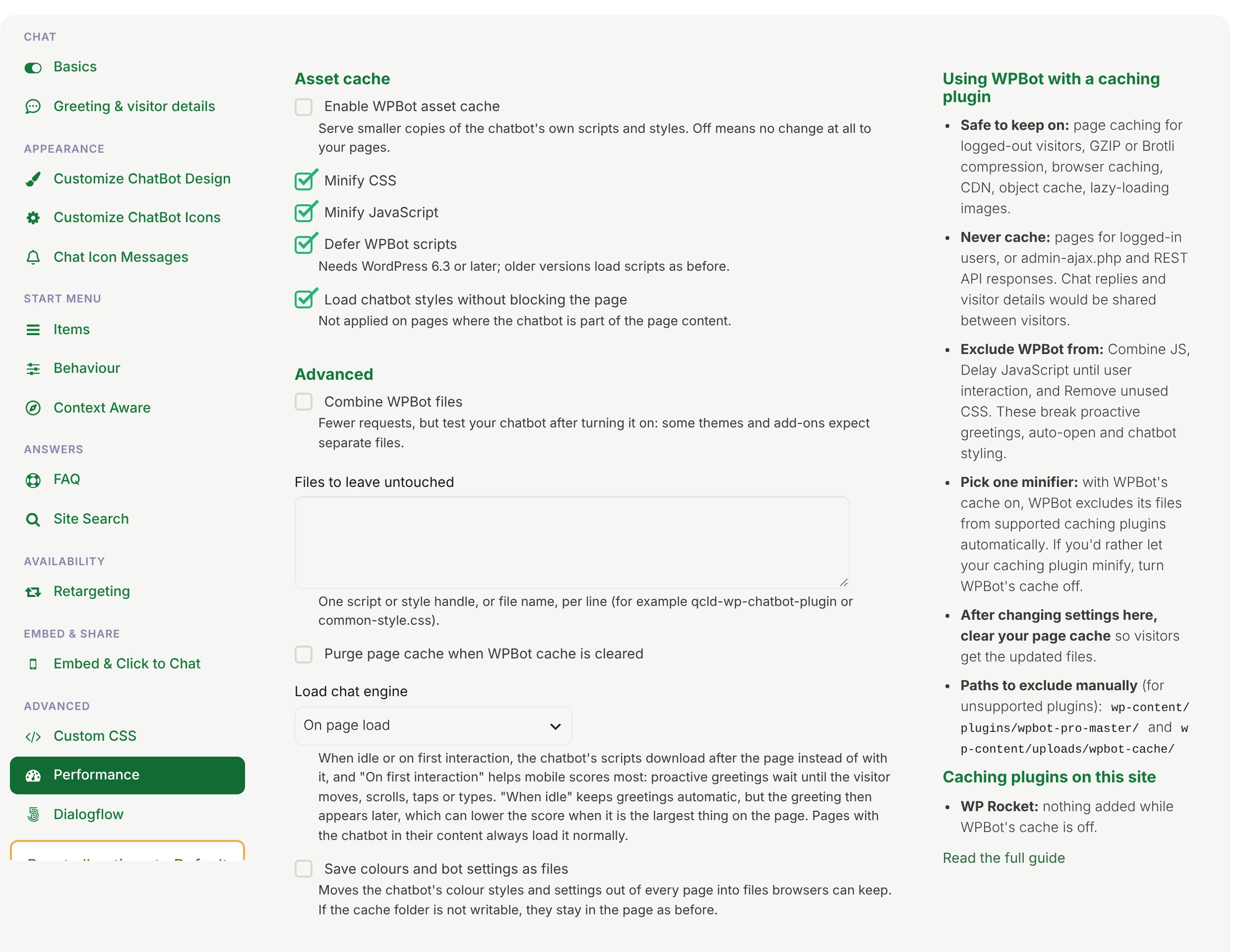
ChatBot → Performance: the asset cache, Load chat engine and the caching plugin notes.
Why speed matters
Visitors who wait leave. A fast, streamed answer with a source link is what turns a question into a click to your product page or a lead: the Convert step of the Growth Loop.
Availability
In every edition, including WPBot Free. Load chat engine and Save colours and bot settings as files come with every WPBot Pro edition.
Was this article helpful?
Sorry about that. Get help another way:











