

Connect Facebook Pages and Instagram
On this page
Facebook Pages and Instagram connect through one Meta app that you create. Open WPBot Pro → Social → Accounts and click Set up app on the Facebook & Instagram card.
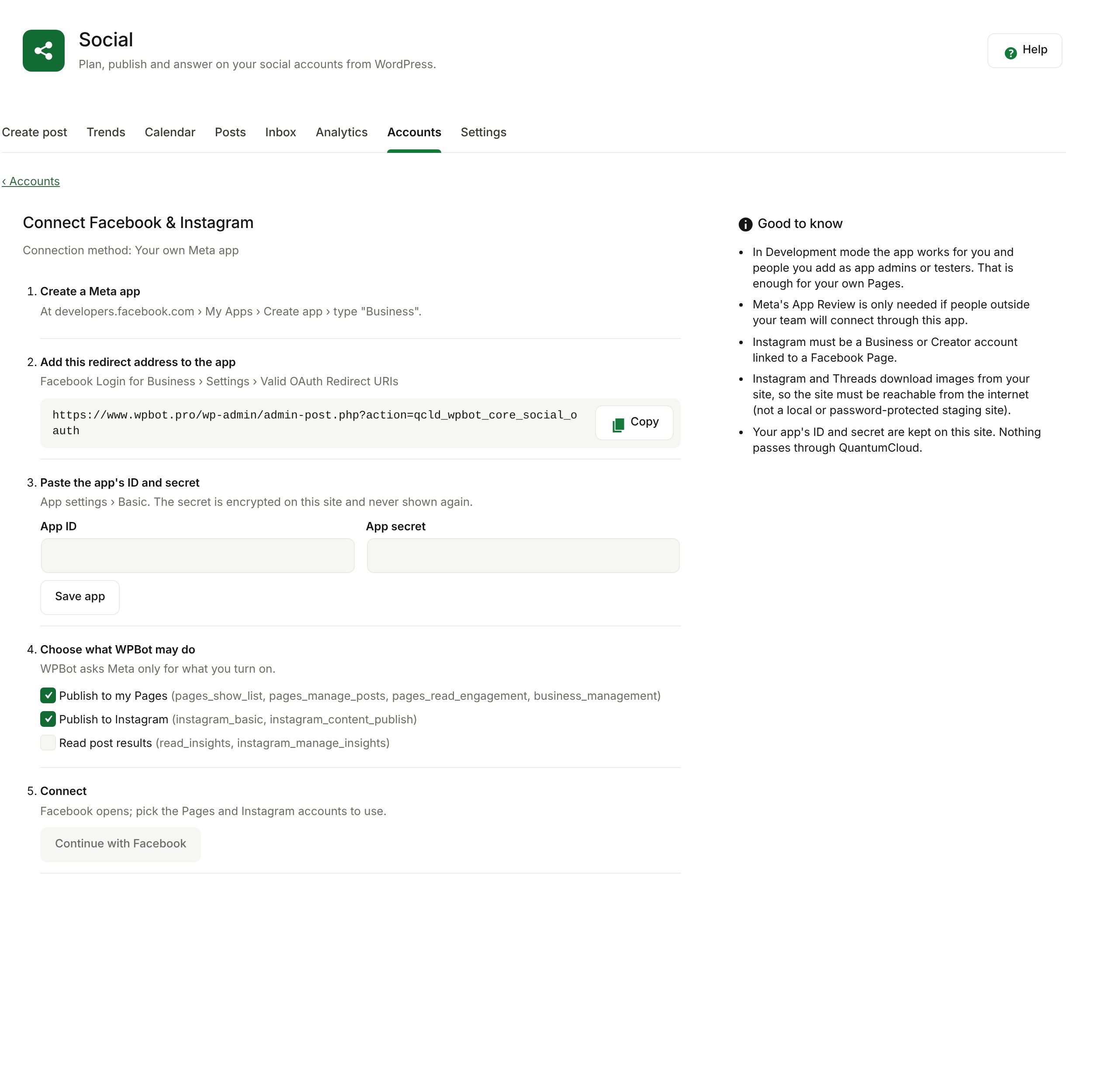
Connect Facebook & Instagram with your own Meta app.
Before you start
- Instagram must be a Business or Creator account linked to a Facebook Page.
- Your site must be reachable from the internet: Instagram downloads the images from your site.
Step 1: Create a Meta app
At developers.facebook.com, open My Apps → Create app and choose the type Business.
Step 2: Add the redirect address
Copy the redirect address shown on the screen (click Copy). In your Meta app, add it under Facebook Login for Business → Settings → Valid OAuth Redirect URIs. It looks like this:
https://your-site.com/wp-admin/admin-post.php?action=qcld_wpbot_core_social_oauth
Step 3: Paste the app's ID and secret
In the Meta app, open App settings → Basic. Paste the App ID and App secret and click Save app. The secret is encrypted on your site and never shown again.
Step 4: Choose what WPBot may do
WPBot asks Meta only for what you turn on:
| Option | Meta permissions |
|---|---|
| Publish to my Pages | pages_show_list, pages_manage_posts, pages_read_engagement, business_management |
| Publish to Instagram | instagram_basic, instagram_content_publish |
| Read post results | read_insights, instagram_manage_insights |
Turn on Read post results if you want reach and engagement in See which posts bring visitors, leads and sales.
Step 5: Connect
Click Continue with Facebook. Facebook opens; pick the Pages and Instagram accounts to use. They appear in Connected accounts.
Note
In Development mode your Meta app works for you and the people you add as app admins or testers. That is enough for your own Pages. Meta's App Review is only needed if people outside your team will connect through this app.
What you can post
- Facebook Page: text, link and photo posts. With Master, up to 10 photos in one post.
- Instagram: a single image. With Master, also carousels of up to 10 images, Reels and Stories.
Comments in the Inbox
Comments on posts you published with Social can come into the Answer comments and reviews in the Inbox, where the ChatBot drafts replies. Private messages (Messenger and Instagram Direct) are answered by the ChatBot's Messenger channel, not by Social.
Tip
If you also use the ChatBot's Messenger or Instagram channel, it may use a different Meta app. That works, but keep both apps' settings up to date.
Availability
Facebook and Instagram posting is in every edition, including WPBot Free. Facebook multi-photo posts, Instagram carousels, Reels and Stories, the Inbox and Analytics are Master only.
Was this article helpful?
Sorry about that. Get help another way:











